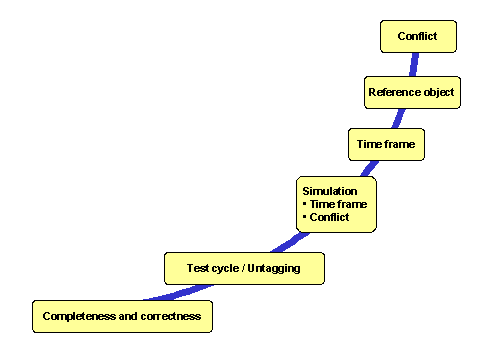
Check/Simulation
Use
You can use checks to ensure that lockout/tagout can be processed safely and free of conflict. The checks run automatically. Some checks are mandatory, some are optional. You can deactivate optional checks in Customizing.
We distinguish between general checks and dedicated checks. The general checks run during every operational step; the dedicated checks only run for certain operational steps.
Features
The system uses the general checks to check, among other things, whether:
An authorization is available
Switching is blocked by an approval
The operational step is valid
Switching is blocked by an operational protection
In addition, there are also the following dedicated checks:
You can also execute the dedicated checks as a simulation:
On the maintenance screen of the work clearance document you can simulate whether the items can be completely tagged or untagged.
On the switching screen of the Operational WCD you can simulate what would happen if you tag or (temporarily) untag the selected items. In this case, the system simulates the checks that would be executed subject to the respective planned status.
If you set the status
PREP (Prepared),
the system automatically executes the check “Tagged or untagged”:
All other dedicated checks occur with the following statuses:
Check/Simulation |
Status
|
Status
|
Status
|
|---|---|---|---|
Completeness and correctness |
X |
X |
|
Test cycle |
X |
||
Untagging |
X |
||
Time frame |
X |
X |
X |
Reference object |
X |
||
Conflict |
X |
X |
X |
The graphic shows the order in which the dedicated checks and simulations are executed.