 Overview: Customizing and Assignments
The figure below shows the assignments for deriving qualifications from training data entered for a flight. You define these assignments in Customizing, make them in the applications, and have them created by the system.

If you enter training data for a person directly, the Customizing settings and assignments to flights listed below are not relevant.
You can make other Customizing settings in addition to these. These are named in conjunction with the relevant functions.
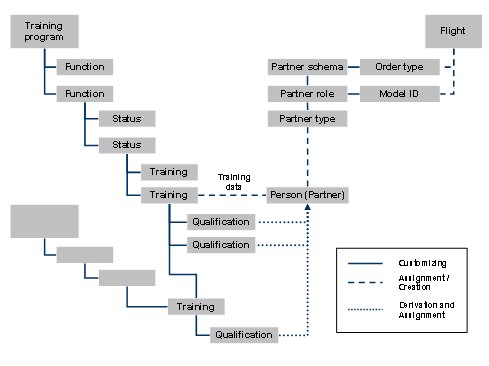
Assignments
Customizing
To enter training activities, you must define the required
training programs in Customizing under
Defense Forces and Public Security
→
Personnel
→
Training
→
Define Training Program
. By doing so, you assign training courses to these training programs depending on their function (activity profiles) and status (training level).
You also define the following assignments:
Under
Training to Training Assignment
, you define whether the training data for a training course should be transferred to the HR master data as well as the training data of another training course when a flight is
transferred
.
Under
Qualification to Training Assignment
, you define which qualifications are to be
derived
from which training data in infotype 0806.
If you want to record training data for flights, you must define which partner roles you want to use for these flights in the Implementation Guide (IMG).
Under
Plant Maintenance and Customer Service
→
Maintenance and Service Processing
→
Maintenance and Service Orders
→
Partner
, you use a partner schema to define which partner roles you want to use for which order types.
If you want to copy the training activities entered to the master data of persons and derive the relevant qualifications, you must use the partner roles with the Personpartner type.
Under
Defense Forces and Public Security
→
Personnel
→
Training
→
Partner
→
Assign Partner Roles to Model IDs
, you define which partner roles you want to use for which model IDs (for more information, see
Flight
).
Assignments (Flight) and Entry (Training Data)
You specify an order type and a model ID for a flight.
Using the intersections of the relevant settings for partner roles, the system determines which partner roles are available for each flight.
You assign persons to the flight as partners.
You assign training courses to the persons for the flight concerned and enter the completed training activities (training data).
Deriving and Assigning (Qualifications)
In accordance with your Customizing settings, the system derives the completed qualifications from the training data of a person and assigns them to the person.