 Communication and Operating Statuses
Use
Communication can be established between the systems in a system group in various operating statuses depending on the situation.
Integration
See also Synchronization Mechanisms .
Features
The systems in the system group can have the following operating statuses:
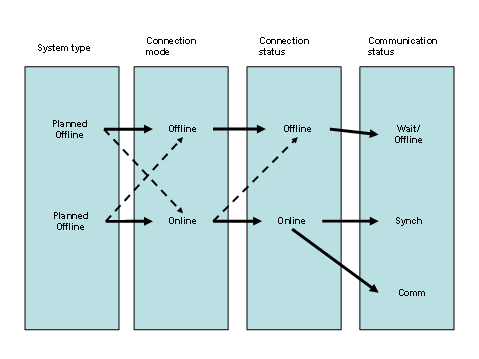
Operating Statuses
System Type
You use the
System Type
property to specify whether a system is usually in
Offline
or
Online
connection mode.
Planned Offline
The system is usually
not connected to a partner system over a longer period of time and is therefore usually in the
Offline
connection mode.
Planned Online
The system is usually connected to a partner system over a longer period of time and is therefore usually in the
Online
connection mode.
You define the system type in Customizing for
Defense Forces & Public Security
→
Distributed System Landscape
→
Systems and Connection Parameters.
This property is primarily for information purposes and controls only the output of error messages: An interrupted connection is always handled as an error for systems of system type
Planned Online
, but only under certain circumstances for systems of system type
Planned Offline
.

If you change the system type of a system, you must delete the CCMS node that belongs to this system and recreate it using the report /ISDFPS/ALE_CREATE_CCMS_NODE.
Connection Mode
The connection mode determines whether a system can currently establish a connection to its partner system.
Offline
The connection has been interrupted. The synchronization report is stopped. The system has the
Offline
connection status.
You use the
Set
System to OFFLINE Mode
application (transaction /ISDFPS/SET_OFFLINE) to manually set a system to
Offline
mode.
You use the
connection parameters
to specify the number of attempts to establish a connection after which the system automatically sets the mode to
Offline
.
Online
The system can establish a connection to its partner system. The system can have
Online
or
Offline
connection status.
You use the
Set
System to ONLINE Mode
application (transaction /ISDFPS/SET_ONLINE) to manually set a system to
Online
mode.
Connection Status
The connection status determines whether a system is actually currently physically connected to its partner system.
Offline
If the system status is
Offline
, it is not connected to its partner system.
Online
If the system status is
Online
, it is connected to its partner system.
Communication Status
The communication status specifies how data is currently being exchanged. See also Synchronization Mechanisms .
Wait/Offline
Systems with
Offline
connection status have the
Wait
(central system) or
Offline
(decentralized systems) communication status.
Sync
Systems with
Online
connection status have the
Sync
communication status while synchronization is running.
Comm
Systems with the
Online
connection status have the
Comm
communication status while synchronization is not running and current transaction data can be sent immediately.
An overview of the systems in the system group and their system type, connection mode, and communication status is available with
ALE Status Monitoring
and
CCMS Monitoring
. You can also check the current communication link using the
Status of Connection to Partner System
application
(transaction /ISDFPS/SYSTEM_STATE).