 Synchronization and Transient Transition
Use
The systems in the system group use the transient transition functions to control the synchronization process, particularly if communication between the partner systems is interrupted.
Features
Synchronization report
You can use the
ALE Synchronization
application (transaction /ISDFPS/SYSTEM_SYNC) to control how data is synchronized between the systems in the system group. These can be used in the following ways:
For systems with the
Planned Online
system type, you can schedule the synchronization report
regularly as a job.
For systems with the
Planned Offline
system type, you start the synchronization report
manually.
For systems with both system types, the synchronization report is triggered if the check for the RFC connection reveals that the connection has been restored ( transient transition).
See also Synchronization Report: Process Flow .
Whereas the
ALE Synchronization
application (transaction /ISDFPS/SYSTEM_SYNC) synchronizes data with just one partner system in each case, you can use the alternative
ALE Synchronization
(/ISDFPS/ALE_SYNC) to synchronize data with all relevant partner systems.
Regular Synchronization
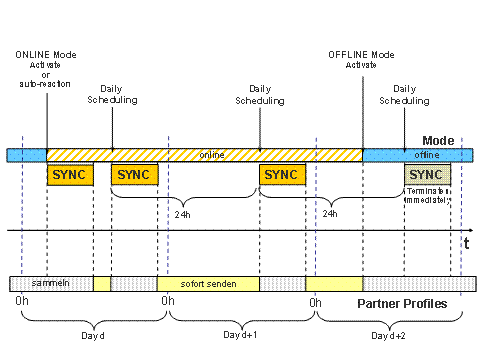
ALE Synchronization (Regular Scheduling)
During the synchronization process, the partner profiles for all message types are set to
Collect
. Between two synchronization runs in
Online
mode, the partner profiles are set to
Send Immediately
for messages whose assigned priority category has the
Communication Mode
indicator set.
When the system switches to
Offline
mode, the partner profiles are set to
Collect
. In this case, the process for scheduling regular synchronization runs starts during the relevant scheduling timeframe and terminates immediately once the current mode has been checked.
Transient Transition
The system can regularly check communication between the partner systems:
The CCMS checks the connection using the parameter RDISP/AUTOABAPTIME.
Alternatively, you can use the application
Connection Monitoring:
Partner System and Auto-Reaction
(transaction /ISDFPS/SYSTEM_MON) to check the connection. This report allows you to set much shorter time intervals.
If the check reveals that the RFC connection has been
interrupted, the system sets the partner profile to
Collect
and prevents the IDoc from being transferred to the tRFC queue (the IDocs in the IDoc queue can thus be prioritized).

In the current online operation, interrupted connections that are shorter than the configurable time span Δt are handled by the ALE layer. If the connection is interrupted for longer than Δt or if the maximum number of repetitions N has been reached, the partner profiles are automatically reset to
Collect
If the check reveals that the RFC connection has been
restored, the system starts the synchronization report and sets the partner profile to
Send Immediately
for messages whose assigned priority category has the
communication mode
indicator set.
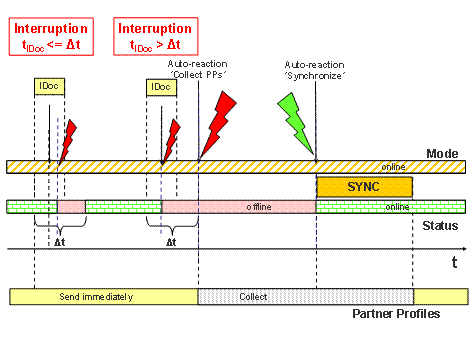
Transient Transition During IDoc Transmission
If a connection is interrupted during an ongoing synchronization process, a transient transfer takes place by terminating the appropriate report and rescheduling it after the defined timespan Δs.
The report is canceled if the sending queues could not be cleared within the configurable time span Δo. The report is rescheduled up to M times. If this parameter is exceeded, the system automatically switches to offline mode and outputs a message to this effect.
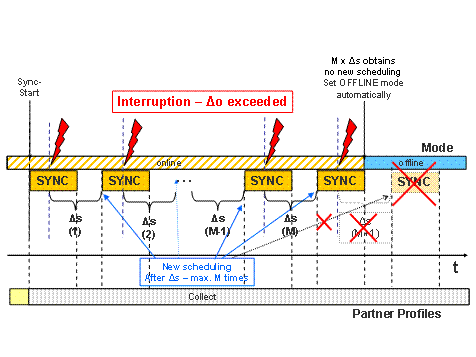
Transient Transition During the Synchronization Process (I)
You can enter an extremely high value for the repetition parameter M – for example, so that Δs x M equals 12 hours. Δs should be chosen in accordance with the availability characteristic of the WAN connection of the relevant system.
If the connection has been interrupted for a long time while the system is in
Send Immediately
status, the system must reset the partner profiles for the transaction data to
Collect
so that the number of tRFCs in the queue does not become too large.
Switching to offline mode manuallywhile the synchronization process is being rescheduled has the effect that the synchronization report defines the new mode at the next scheduling point the next time the report is run and terminates immediately without being rescheduled again, even if the maximum number of reschedulings M has not yet been reached.
The next time the system switches to online mode, another synchronization run takes place.
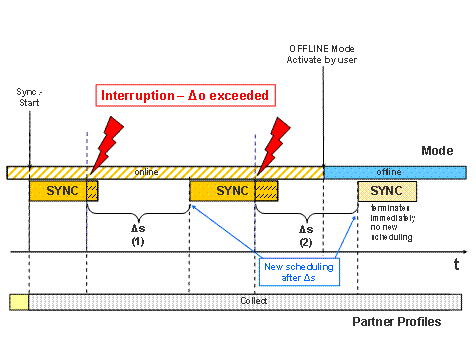
Transient Transition During the Synchronization Process (II)