 Entering and Approving Training Activities
Use
For persons that are assigned to a flight, you enter the training activities that this person has completed as part of their activities for this flight. You then approve this data.
Prerequisites
You have assigned persons (partners) and this training to the flight concerned. For more information, see Assigning Personnel and Training Programs .
You have familiarized yourself with the authorization objects DF_TRAIN* that are used to control authorization for access to training data.
If necessary, you have defined your own authorization or plausibility checks for assigning partners to flights in Customizing under
Defense Forces and Public Security
→
Personnel
→
Training
→
Checks
→
BAdI: Define Checks for Target and Actual Values
Features
Applications and Functions
The following applications are available for creating and approving training activities:
You can use the
Confirmation for Flight Training Programs
application (transaction /ISDFPS/PMTR1) to
enter training activities:
You can choose
Confirm All
to copy all authorized values to the selected flight as actual values.
You can choose
Create New Training Data
to assign a new training program to a selected partner
.
You can choose
Edit Training Data
to create data for a training program that has already been assigned.
You can choose
Edit
→
Delete All
to delete of the all actual values for the selected flight.
The system deletes all assignments to training programs that were made using this application.
You can choose
Copy Authorized Values
to copy the authorized value of the selected training program for the selected partner as actual values.
You must choose
Copy
to then confirm the created actual values so that they are not lost when you call a different training program.
You can use the
Approval for Flight Training Program
application (transaction /ISDFPS/PMTR2) to
approve training activities:
You can choose
Approve All
to approve all of the actual values for the selected flight.
You can choose
Release Training Data
to approve the actual values of a partner for each selected status or training program.
You can choose
Reject Training Data
to reject the actual values of a partner for each selected status or training program.
You can choose
Approve
to approve the actual values of the selected training program for the selected partner.
You can choose
Reject
to reject the actual values of the selected training program for the selected partner.
You must choose
Copy
to then confirm the approval so that it is not lost when you call a different training program.
You can use the
Confirmation and Approval for Flight Training Program
application (transaction /ISDFPS/PMTR3) to
record and approve the training activities:
You can choose
Confirm All
to copy all of the authorized values for the selected flight as actual values and automatically approve them.
You can choose
Create New Training Data
to assign a new training program to a selected partner
You can choose
Edit Training Data
to create data for a training program that has already been assigned.
You can choose
Edit
→
Delete All
to delete of the all actual values for the selected flight.
All assignments to training programs that were made using this application are also deleted.
You can choose
Copy Authorized Values
to copy the authorized value of the selected training program for the selected partner as actual values and automatically approve them.
You must choose
Copy
to then confirm the created actual values so that they are not lost when you call a different training program.
Display
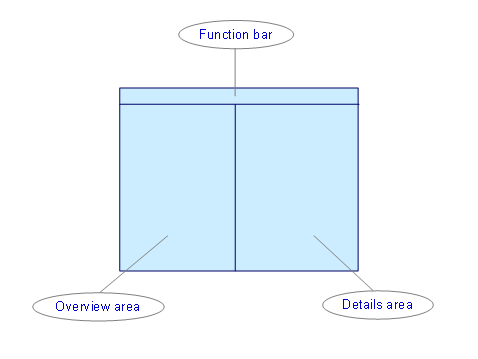
Screen Areas
The system displays the persons (partners) and training programs that are assigned to the selected flight in the overview area. The system displays the details of a selected training program of the selected person (partner) in the details area:
Flight Data
screen area
Enter the basic data for the selected flight.
Training Program
screen area
In addition to the basic data of the training program, this area displays the training programs for which training activities can be created and/or approved:
Training
/
Name
Training program for which training activities can be created
Authorized
Required training activity
Actual
Created training activities
Unit
The unit in which the target and actual values are created.
Date
Date on which the training activity was completed
Release
Specifies the approval status in the applications that you can use to approve actual values
General Functions
You can choose the
Cancel
pushbutton to cancel the creation or approval. Unsaved data is lost.
You can call the referenced flight directly (
Flight
pushbutton) and display the persons assigned to the flight, and, if necessary, change assignments (
New Person
pushbutton).
Data Storage
The entered training activities (training data) and their approval status are stored in the
/ISDFPS/PM_TP_O table. The values in the
Approved
field specify whether the actual values have already been approved or rejected. Only approved training data can then be copied to infotype 0806.
Activities
Choose the required application.
Select the required flight.
In the overview area, select the required partner and training program.
Create and/or approve the required training activities.
Save your changes.
To be able to derive qualifications from these training activities, you must first copy the data to infotype 0806. For more information, see Copying Training Data (Infotype 0806) .