 Properties (Infotype 1950)
Definition
The organizational properties of a force element.
Use
To identify force elements more precisely, you specify their organizational properties that are specific to armed forces, police, and aid organizations.
Structure
The following fields are available in the
Structures Workbench
on the
Properties
tab page:
Planning Status
The status of the underlying infotype record.
Country
Specifies the country.
Organizational Area
Organizational areas are mapped for each country to describe the structure of your organization (independently of the organizational structure). You assign a force element to an organizational area.
In the event of reorganization, the system checks whether the organizational area of the new higher-level force element is identical to the lower-level force element. If this is not the case, the user is informed and can adjust the organizational area details and dependent properties (structure type and so on).
When a new force element is created, the country and organizational area are copied from the higher-level force element as default values. Authorizations can be used to control whether a user is allowed to change these values.
You define organizational areas and their assignment to organizational area types in Customizing, by choosing
Defense Forces & Public Security
→
Organizational Flexibility
→
Force Element
→
Define Organizational Areas
Organizational Area Type
Organizational areas are grouped by type. Depending on the organizational area selected, the organizational area type is displayed automatically. The types
Military
Civil
Aid Organization
, and
Police
are provided with the standard system.
You define organizational area types in Customizing, by choosing
Defense Forces & Public Security
→
Organizational Flexibility
→
Force Element
→
Define Organizational Area Types
Structure Level
Structure levels are defined for an organizational area type to describe the hierarchical relationship (and therefore the size) of an organizational unit. You assign a force element to a structure level.
You define structure levels in Customizing, by choosing
Defense Forces and Public Security
→
Organizational Flexibility
→
Force Element
→
Define Structure Levels
Structure Type
Structure types are defined for each structure level in an organizational area. These structure types describe the hierarchical relationship (and therefore the size) of the organizational unit. You assign a force element to a structure type.
You define structure types in Customizing, by choosing
Defense Forces & Public Security
→
Organizational Flexibility
→
Force Element
→
Define Structure Types
Branch
An organizational area has its own branches that represent task-specific types. You assign a force element to a branch.
You define branches in Customizing, by choosing
Defense Forces and Public Security
→
Organizational Flexibility
→
Force Element
→
Define Branches
Branch Addition
You can use a branch addition to further specify a branch. You assign a force element to a branch addition.
You define branch additions in Customizing, by choosing
Defense Forces and Public Security
→
Organizational Flexibility
→
Force Element
→
Define Branch Additions
Branch Type
Branches are grouped by type. Depending on the branch selected, the branch type is displayed automatically.
You define branch types in Customizing, by choosing
Defense Forces and Public Security
→
Organizational Flexibility
→
Force Element
→
Define Branch Types
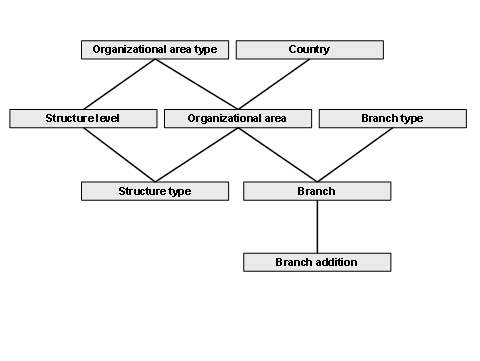
Organizational Properties
Agency
A military agency is an independent, organizational element that is formed on the command or instruction of the organization and that is solely responsible for an assigned task area in line with the authority granted to it.
Symbol Code
The 15-character symbol code (in accordance with
MIL-STD-2525B, Common Warfighting Symbology
) is automatically generated on the basis of the organizational properties.
Choose the
Generate Symbol Code
pushbutton to trigger the automatic generation of the symbol code manually.
Choose the
Adjust Symbol Code Manually
pushbutton to change the symbol code if required. When the organizational properties of the force element are next changed, the system generates the associated symbol code again automatically and overwrites your manual changes.
You define the generation of the symbol code in Customizing, by choosing
Defense Forces and Public Security
→
Organizational Flexibility
→
Force Element
→
Define Symbol Code
Information about the composition of the symbol code is also located here.
The symbol code can be used to determine the correct tail number for displaying military organizations in geographical information systems (GIS).
Unit Identifier Code
In accordance with the basic definition
STANG 5500
and
A-DatP-3
, the unit identifier code (UIC) is made up of the two-character county code, the one-character organizational area, and a user-definable, six-digit number. The system copies the country code and the organizational area. The first four digits of the six-digit number describe the unit level of the assigned organizational area, and the last two digits of the six-digit number can be used to further subdivide the unit level.
Reference Force Element
The assignment to a reference force element is for information purposes only.
This data is stored in infotype 1950 (component specific).
In addition, the following are displayed on this tab page to the day:
Usage Type
Specifies the structures in which the object is included.
You define which relationships are evaluated and displayed as well as which code is used to represent these relationships in Customizing,by choosing
Defense Forces and Public Security
→
Organizational Flexibility
→
Command and Support Relationships
→
Define Usage Types.
Addition
Specifies whether setting up a task organization results in the force element:
being assigned an additional force element
losing an assigned force element
Both cases can also occur simultaneously.