Assigning Line Activities
Use
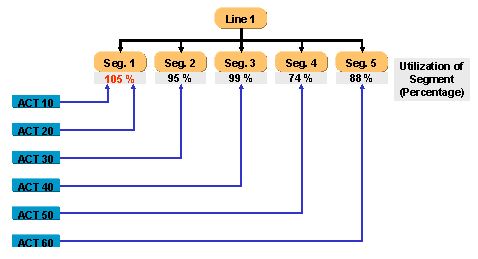
With this function you assign the modes of a line activity to the line segments. These assignments allow you to:
determine the best utilization of the time available in the line segment
calculate the exact requirements dates of the components in MRP with the planning matrix
determine the supply areas of the components for the subsequent processes.
For further information, see also: Exploding a Line Routing for Line Balancing .
Prerequisites
You have created a product structure, a process structure with type
Line Routing
, and a line structure in iPPE. You have already assigned the components to the line activities in the line routing.You have assigned the production resources, if necessary.
You have created a
model mix
and aline balance
.You must create a filter and enter the line balance in the filter when you do not work with the line balance itself but make the assignments in the line structure.
Features
When you use a
line balance
object as an access, you can enter the mode of a line activity on theLine Balance Relationships
tab page for the line element. This enables you to make assignments for individual line elements.You can assign the line activities using drag and drop in the
Application List – Process Assignment
. This enables you to make assignments quickly for a complete line structure. The application list shows you immediately which line activities from the selected line routing are already assigned.You can also use drag and drop to make the assignments in the
Process Structure
Application Tree
. However, this has the disadvantage that you cannot see which line activities from the selected line routing are already assigned.In the line balance you can analyze a whole line structure or an individual line element
When you assign line activities to the line elements, the system calculates the available time (available capacity) of a line segment using the following formula: “Number of assigned production resources multiplied by takt time.” It then compares the available capacity with the work content from the assigned line activities. You can increase the time available at the line segment in question if the available capacity is insufficient. To do so, increase the number of production resources that you have assigned to the line segment.
The system calculates the takt time from the
line balance rate
specified in the line balance. Example
Example
You have entered
2
in theNumber
field for a production resource of typeworker.
You assign this production resource to a line segment. The takt time amounts to 5 minutes. The available capacity of this line segment is calculated as follows: 2 workers x 5 minutes results in 10 minutes available time.End of the example.You can also assign line activities to the work areas. The available time is calculated in the same way as for a line segment.
The percentage utilization of a line segment is calculated using the following formula: “Work content / available capacity x 100”.
Example