Show TOC Start of Content Area

Procedure documentation Developing a Value Set Provider  Locate the document in its SAP Library structure

Use

A value set provider provides a set of allowed values for a dedicated parameter. This set can be used to show drop down list boxes in the UI or to validate a user input. The following figure shows the template wizard with an opened value set. The value set lists initial content, that can be used to fill the folder of an iView, when a room or room part is created.
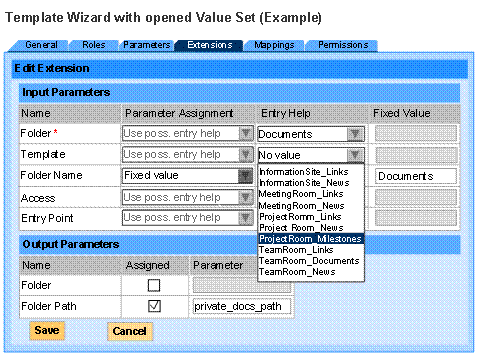
This graphic is explained in the accompanying text

Prerequisites

Like extensions, value set providers are portal services, and they are also displayed in the template wizards. Because of this, the first four steps to develop a value set provider are identical.
See Developing a Room Extension:

·        The project must be set up (steps 1 to 3)

·        The same methods are implemented to make the value set provider displayable (step 4).

Procedure

...

       1.      List the value sets

The value set provider defines a list of parameters, for which it exposes value sets. The sample source shows how the parameter list is built.

public IParameterInfo[] getParameters() {

    IParameterInfo[] result = {

        createParameterInfo(PARAMETER1_ID, PARAMETER1_CLASS),

        createParameterInfo(PARAMETER2_ID, PARAMETER2_CLASS),

        //...

    };

    return result;

 }

       2.      List the required parameters

To compute the value set of a parameter, the provider may require some input parameters. For example, if the value set should be the days of a month, it would require the month and the year to calculate the output. For each parameter in 1, the value set lists the required parameters.

public IParameterInfo[] getRequiredParameters(IParameterInfo parameter) {

    IParameterInfo[] result = null;


    //PARAMETER1

    //no input required


    //PARAMETER2

    if (parameter2.getId().equals(parameter.getId())) {

        IParameterInfo[] result = {

            createParameterInfo(PARAMETER3_ID, PARAMETER3_CLASS),

            //...

        };

        return result;

    }


    //PARAMETER3

    //...


    return null;

}

Please note that in the current version of the rooms this feature is not supported by the UI, so that it cannot be used. You will just code the last line to return null.

       3.      Make the value set provider executable

The value set provider computes the value set for each parameter listed in 1.It takes the required input parameters defined in 2 from a context.

public IValueSet getValueSet(IParameterInfo parameter, IExtensionContext context) throws ValueSetProviderException

{

    //PARAMETER1

    if (parameter1.getId().equals(parameter.getId())) {


        //get input parameters

        String parameterValue2 = (String)context.getValue(PARAMETER2_ID);


        //compute the value set

        IDisplayable value1Displayable = extensionFactory.createDisplayable(

            VALUE_ID1, RESOURCE_BUNDLE, "lbl_" + VALUE_ID1,

            "dsc_" + VALUE_ID1);

        Object value1 = getValue(parameterValue2);

        ...

        IParameterValue[] result = {

            extensionFactory.createParameterValue(value1Displayable, value1),

            extensionFactory.createParameterValue(value2Displayable, value2),

            //...

        };

        return extensionFactory.createValueSet(result, exclusive);


    }


    //PARAMETER2

    ...


    return null;

}


See also:

·        Room Extensions

·        Creating Room Extensions

·        Developing a Value Set Provider


End of Content Area