
 Interface-Based Message Processing

Messages processed with the Integration Server are based on XML. How can an application send a message of this type to a receiver? The idea is similar to remote function calls (RFCs): Communication with another system is encapsulated using an interface, whose parameters are converted into a message. However, the significant difference when compared to RFCs is that the Integration Server always requires two interfaces for communication: one on the sender side and one on the receiver side. This has the advantage that the sender and receiver interfaces do not need to match exactly (loose coupling).
The following graphic illustrates schematically how a message is sent to a receiver using a sender interface:

Multiple receivers can exist, the principle remains the same.
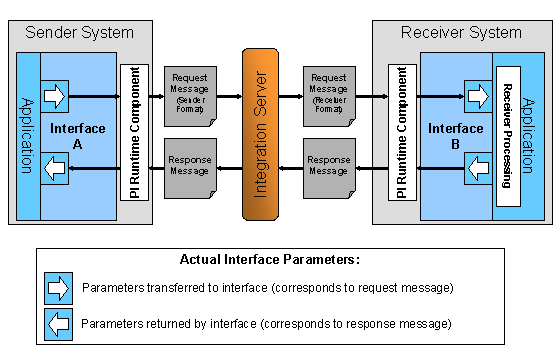
The graphic illustrates that for an interface A in a sender system, there is an interface B in the receiver system:
● Interface B describes the inbound interface of an application.
● Interface A describes the outbound interface of an application.
At runtime, inbound interfaces give you access to a service that finds and returns customer data for an order. Outbound interfaces are used to call a service by means of the Integration Server.
Separation Using Outbound and Inbound Interfaces
To send a message,
simply call the outbound interface (interface A in the figure) and transfer
the parameters for the request message. Furthermore, on the receiver side, you
must implement receiver processing for the inbound interface (interface B in
the graphic). As indicated by the broken arrows, communication can only
comprise the transfer of one message, regardless of whether the communication
is synchronous or asynchronous (see also:
 Communication
Parameters).
Communication
Parameters).
Outbound and inbound interfaces are used to separate (potential) senders and receivers. The interface parameters do not have to match for a message exchange to be possible (but a mapping is required at runtime if they do not). This enables various different senders and receivers to communicate with each other. In particular, this loose coupling also enables you to assign interfaces to each other when one side of the communication must not, or cannot be changed. For example, an outbound interface can be an operation of a service interface for calling an RFC in a 4.6C SAP System. In this call, the RFC has the role of an inbound interface.
You assign outbound and inbound interfaces to each other at configuration time by means of an interface determination.
Interface Types and Runtime Components
The application does not need to perform any implementation to convert the parameters to or from a message. This task is performed by one of the following runtime components in usage type Process Integration, depending on the type of interface (see also: Connectivity):
In the simplified graphic, the PI runtime component is shown as part of the application system. This applies for proxy runtime, but depends on the adapter type in the case of adapters.
Interface
Type |
PI Runtime Component |
Program Model |
Proxy |
Proxy Runtime |
Proxies are executable interfaces in the application system. You can only create them in the system by starting with service interfaces and using the proxy generation functions. There are ABAP and Java proxies. |
IDoc |
IDoc Adapter |
You can connect all interfaces that are already available in the system to the Integration Engine by using adapters. The adapters map between the XI message protocol and the relevant interface type. Where adapters do not call an interface (for example, if the message data originates from a database or file), you must enter the name of an arbitrary interface in the configuration. |
RFCs, BAPIs |
An adapter from the Adapter Engine |
|
Interfaces from Non-SAP Systems |
If you use service interfaces, this is the outside-in approach; for all other interfaces, this is the inside-out approach (see Design Time). In both cases the Enterprise Services Builder allows you to save the interface description in the Enterprise Services Repository: You can create service interfaces directly in the ES Repository, you can import RFCs, BAPIs, and IDocs to the ES Repository, and you can upload message schemata in WSDL, XSD, or DTD to the ES Repository as well. The interface description in the ES Repository is decoupled from the implementation and this has the following advantages:
● You can access the information about the message structure centrally.
● You can use the interface description for application development in the systems and simultaneously for the design of process integration scenarios, integration processes, and mappings
See also: Communication Parties (Case Examples)