
 Design Time

Communication using the Integration Server is interface-based. That is, messages are generally created by calling an interface. There are two approaches for implementing a cross-system process:
● Outside-In: You create the relevant interfaces for the cross-system process in the ES Builder. These service interfaces are a programming language-independent description in XML. You use these service interfaces to generate callable interfaces (proxies) in target systems.
● Inside-Out: The functions that are to be called using the Integration Server already exist in an application system. To be able to use an interface description of these functions in the design process, you import specific interface descriptions to the ES Repository by using the ES Builder (see External Programs and Descriptions at the end of this section).
See also: Interface-Based Processing of Messages..
You can also combine the two approaches. Regardless of the interfaces that you require for your cross-component process, you have to work simultaneously in the following development environments during design time:
● You use the ES Builder to design and define all objects affecting message exchange (see below). In some cases you can use external tools and import objects to the ES Repository.
● You implement message processing in your application program by using the development environment of your application systems.
Design Objects in the Enterprise Services Builder
The following graphic provides an overview of the design objects that developers can create in the ES Repository by using the ES Builder.
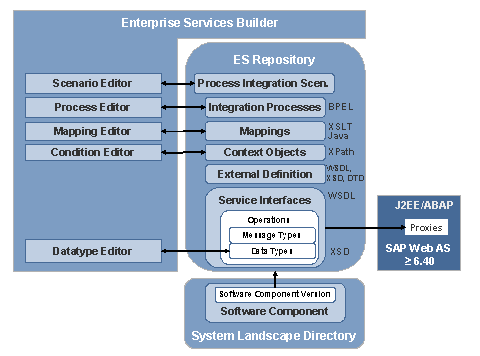
The ES Builder allows you to edit the following objects by using the corresponding graphical editors (shown on the left-hand side of the graphic):
● Process Integration scenarios describe the communication between application components on a higher level of abstraction. Integration processes are executable processes on the Integration Server. See: Figure of Collaborative Processes.
●
Mappings are used
to define structure or value mappings between messages that are exchanged
between interfaces. You can define these mappings as graphical
 message mappings
or you can import them into the ES Repository as XSLT or Java
archives.
message mappings
or you can import them into the ES Repository as XSLT or Java
archives.
● Context objects mask access to elements or attributes in the payload. For example, you can specify elements in a deeply nested message structure in conditions by using the short name of a context object, thus sparing you the long hierarchy path.
● Data types and message types describe the structure of messages that are to be exchanged using service interfaces. Developers use service interfaces to generate proxies in application systems (the graphic only shows outside-in development).
The entire content of the ES Repository can be shipped. Together, these objects are referred to as Enterprise Services Content, abbreviated to XI Content. ESR Content. Using a software component version from the System Landscape Directory you define the smallest possible shipment unit for a number of objects that belong together in the ES Repository. SAP software component versions are also the basis for shipment units from application objects in SAP systems so that ESR content and application content can be assigned to a joint software component version in the SAP system.
For more
information:
Organization of ESR
Content
External Programs and Descriptions
SAP NetWeaver PI is based on various XML standards (see also: Messages). The advantage of this is that you can reuse external programs and schema definitions. The following graphic gives an overview of the formats that you can import to and export from the ES Repository.
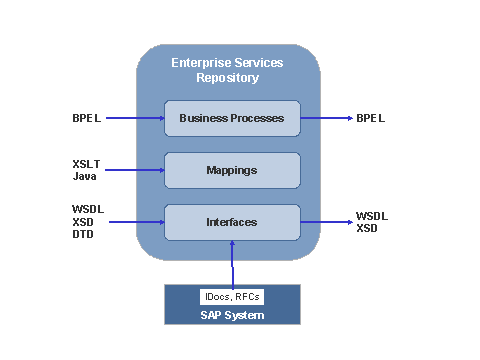
● You can import externally-defined integration processes as BPEL documents (Business Process Execution Language).
●
As an alternative
to graphical message mappings (which the ES Builder uses to generate Java
programs), you can also import externally-defined XSLT mappings or Java
mappings to the Enterprise Services Repository, to execute at runtime (see:
Imported Archives
(XSLT/Java)). It is also possible to combine different mapping program
types with each other (see:
References Between
Mapping Programs).
●
You can import
interface descriptions for IDocs and RFCs (see
Importing IDocs and
RFCs).
●
You can import
external
definitions (DTD, XSD, and WSDL) and reuse message schemas from these
documents within the ES Builder.