Columns (General)
Columns are the main element of an ALV output. You can define a number of properties for a column to change whether and how a value is displayed in the column.
Column Description
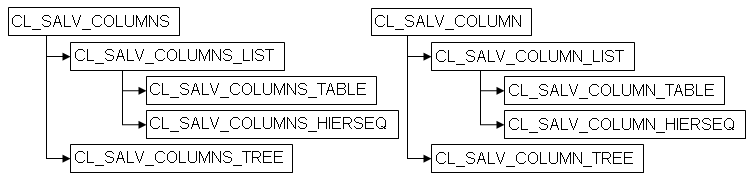
In the ALV object model, a COLUMN object (class CL_SALV_COLUMN) is generated automatically for every column in your internal data table. All of the COLUMN objects are represented by the COLUMN object (class CL_SALV_COLUMNS and its subclasses).
During generation of table instances, the ALV object model determines all relevant and available properties from the DDIC description of your internal data table and assigns them to the individual column objects.
If table columns refer to local program fields, ALV is only able to determine a part of the possible column properties. These are mainly the technical descriptions such as internal length, internal type and so on.
With the methods for class CL_SALV_COLUMN (or its subclasses), you define more properties as needed. The following graphic shows the inheritance hierarchy of a column object:
Column Types
You are able to differentiate between the following column types:
-
Standard columns
-
Lead columns, which are columns that have a special textual meaning in your ALV output.
-
Special columns that control the meaning or display of other columns or that are reserved for special functions
Some of the settings that you make for a column are valid for all of these column types, but some are only reserved for a specific type of column.
You are able to make the following settings for all columns.
-
Set the visibility of the column
-
Change Position of the Column within the ALV Output
Get Column Objects
The GET_COLUMNS method exists in each ALV main class. It returns the column descriptions of all columns in the ALV output (all column objects). You use this object (class CL_SALV_COLUMNS) and the GET method or GET_COLUMN methods to get the desired column description.
|
Function |
Class |
Method |
|
Get all column objects |
CL_SALV_TABLE CL_SALV_HIERSEQ_TABLE CL_SALV_TREE |
GET_COLUMNS |
|
CL_SALV_COLUMNS |
GET |
|
|
Get all column objects for a hierarchy level |
CL_SALV_HIERSEQ_LEVEL |
GET_COLUMNS |
|
Get specific column object |
CL_SALV_COLUMNS |
GET_COLUMN |
|
Get technical name of the current column |
CL_SALV_COLUMN CL_SALV_ITEM CL_SALV_AGGREGATION CL_SALV_SORT |
GET_COLUMNNAME |
Set the Visibility of the Column
The column set of users are made up of columns that they can hide and display as needed. You have various options for influencing a user's column set:
-
You determine which columns users are shown when the ALV output appears on the screen. This setting is the default setting.
-
You determine which columns are contained in the column set, but are not being displayed on the screen: You set the column as hidden.
NoteFor columns that you have defined as lead columns, you are able to determine whether the user can hide them or not..
-
You are able to determine which columns should not be included in the user's column set: You define the column as a technical column.
NoteMost columns with special technical meaning are automatically technical columns and thus are not included in the user's column set.
|
ALV Tool |
Display Type |
Function Available |
|
Simple, two-dimensional table |
Classic ABAP List |
Yes |
|
Fullscreen |
Yes |
|
|
In the Container |
Yes |
|
|
Hierarchical-sequential list |
Classic ABAP List |
Yes |
|
Tree structure |
Fullscreen |
Yes |
|
In the Container |
Yes |
|
Function |
Class |
Method |
|
Set the visibility of a column |
CL_SALV_COLUMN |
SET_VISIBLE |
|
Check setting for visibility |
IS_VISIBLE |
|
|
Define column as technical column |
SET_TECHNICAL |
|
|
Check whether column is a technical column |
IS_TECHNICAL |
Change Position of the Column within the ALV Output
You are able to change the sequence of the columns within the ALV output.
|
ALV Tool |
Display Type |
Function Available |
|
Simple, two-dimensional table |
Classic ABAP List |
Yes |
|
Fullscreen |
Yes |
|
|
In the Container |
Yes |
|
|
Hierarchical-sequential list |
Classic ABAP List |
Yes |
|
Tree structure |
Fullscreen |
Yes |
|
In the Container |
Yes |
The exception column is always displayed as the first column. You cannot change its position.
|
Function |
Class |
Method |
|
Change the position of a column |
CL_SALV_COLUMNS |
SET_COLUMN_POSITION |
|
Get current position of a column |
GET_COLUMN_POSITION |
Define Column Groups
Using method class CL_SALV_SPECIFIC_GROUPS you can combine multiple columns into one or more column groups. In the dialog box for selecting the column display a new interface is added where the different column groups for display can be selected.