Setting Text Properties
You are able to change the display of text in the ALV output. Depending on whether the text is located in the ALV output itself or in the header of the list, for example, you have different options.
The following sections mainly deal with how you change the display of alphanumeric columns. With numeric columns there are additional options. For more information about this, see Changing the Display of Numeric Values.
You are able to make the following settings for text properties:
-
Set Font
-
Set Alignment of the Text in the Column
-
Determine Lowercase and Uppercase
-
Determine display of empty cells
-
Modifying the content display using conversion routines
Set Font
You are able to change the font of text in the design object (header and footer area of page or list) and in the tree structure.
Font in Design Object
In the classic ABAP list, the various element types that you are able to use in a design object differ in the font. In the other two display types they different font, font size and font color. The following graphic provides a comparison of the fonts as they are set in the various display types for the ALV output for the four element types.
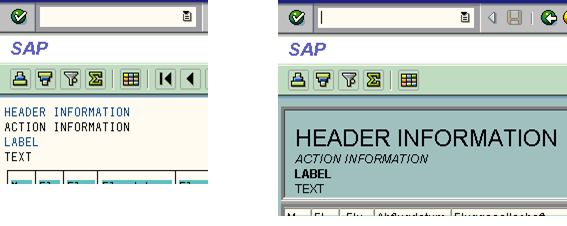
This is how you set the font in the design object using a Choice of Element Type.
Font in the Tree Structure
You are able to choose between three fonts in each item:
-
Standard font
-
A non-proportional font (all characters require the same amount of space)
-
A proportional font (characters have different widths)
|
ALV Tool |
Display type |
Function available |
|
Simple, Two-Dimensional Table |
Classic ABAP List |
No |
|
Fullscreen |
No |
|
|
In the Container |
No |
|
|
Hierarchical-sequential list |
Classic ABAP List |
No |
|
Tree structure |
Fullscreen |
Yes |
|
In the Container |
Yes |
|
Function |
Class |
Method |
|
Get font of an item |
CL_SALV_ITEM |
SET_FONT |
|
Get font of an item |
GET_FONT |
Set Alignment of the Text in the Column
You are able to set where the content of a column will be put:
-
Justified left
-
Centered
-
Right-justified
You are able to change the alignment of text in the design object (header and footer area of page or list) and in the ALV output.
Alignment in the ALV Output
You are able to set the alignment of the text for each column in the ALV output separately.
|
ALV Tool |
Display type |
Function available |
|
Simple, Two-Dimensional Table |
Classic ABAP List |
Yes |
|
Fullscreen |
Yes |
|
|
In the Container |
Yes |
|
|
Hierarchical-sequential list |
Classic ABAP List |
Yes |
|
Tree structure |
Fullscreen |
Yes |
|
In the Container |
Yes |
|
Function |
Class |
Method |
|
Set alignment of the column |
CL_SALV_COLUMN |
SET_ALIGNMENT |
|
Get alignment of the column |
GET_ALIGNMENT |
Alignment in the Design Object
For the following elements, you are able to set the alignment in the design object:
-
Header
-
Action information
-
Label
-
Text
The alignment is only applicable when the following applies:
-
The text is in a table-type layout.
-
The column in which the text is located is wide enough.
You set the alignment for each text element individually.
|
ALV Tool |
Display type |
Function available |
|
Simple, Two-Dimensional Table |
Classic ABAP List |
Yes |
|
Fullscreen |
Yes |
|
|
In the Container |
Yes |
|
|
Hierarchical-sequential list |
Classic ABAP List |
Yes |
|
Tree structure |
Fullscreen |
Yes |
|
In the Container |
Yes |
|
Function |
Class |
Method |
|
Set alignment in the design object |
CL_SALV_FORM_ACTION_INFO CL_SALV_FORM_HEADER_INFO CL_SALV_FORM_LABEL CL_SALV_FORM_TEXT |
SET_HORIZONTAL_ALIGNMENT |
|
Get alignment in the design object |
GET_HORIZONTAL_ALIGNMENT |
Determine Lowercase and Uppercase
If the texts in the internal data table use both uppercase and lowercase letters, you are able to choose whether they will be maintained in the ALV output or whether the lowercase letters should be converted to uppercase letters.
|
ALV Tool |
Display type |
Function available |
|
Simple, Two-Dimensional Table |
Classic ABAP List |
Yes |
|
Fullscreen |
Yes |
|
|
In the Container |
Yes |
|
|
Hierarchical-sequential list |
Classic ABAP List |
Yes |
|
Tree structure |
Fullscreen |
Yes |
|
In the Container |
Yes |
|
Function |
Class |
Method |
|
Convert lowercase letters to uppercase |
CL_SALV_COLUMN |
SET_LOWERCASE |
|
Check whether lowercase letters are to be converted to uppercase letters |
IS_LOWERCASE |
Determine display of empty cells
You are able to determine whether empty cells are to contain a zero or a space.
|
ALV Tool |
Display type |
Function available |
|
Simple, Two-Dimensional Table |
Classic ABAP List |
Yes |
|
Fullscreen |
Yes |
|
|
In the Container |
Yes |
|
|
Hierarchical-sequential list |
Classic ABAP List |
Yes |
|
Tree structure |
Fullscreen |
Yes |
|
In the Container |
Yes |
|
Function |
Class |
Method |
|
Determine display of empty cells |
CL_SALV_COLUMN |
SET_ZERO |
|
Check how empty cells are to be displayed |
IS_ZERO |
Modifying the content display using conversion routines
You can provide a converison routine in the domain of a data element that modifies the content of a cells in the required way. All values of a column are then changed in the same way.
|
ALV Tool |
Display type |
Function available |
|
Simple, Two-Dimensional Table |
Classic ABAP List |
Yes |
|
Fullscreen |
Yes |
|
|
In the Container |
Yes |
|
|
Hierarchical-sequential list |
Classic ABAP List |
Yes |
|
Tree structure |
Fullscreen |
Yes |
|
In the Container |
Yes |
|
Function |
Class |
Method |
|
Defining the Conversion Routine |
CL_SALV_COLUMN |
SET_EDIT_MASK |
|
Getting the Conversion Routine |
GET_EDIT_MASK |