 Postings
Purpose
The following consolidation tasks lead to postings in the system:
Standardizing or corrections to reported financial data
Reclassifications
Interunit eliminations
Elimination of interunit profit and loss
Preparations for consolidation group changes
Consolidation of investments
The system creates documents for all postings, they are also called journal entries. The documents record the changes that are made to the values in the database. This lets you reconstruct all of the changes that were made to the original reported financial data of the consolidation units in order to arrive at the consolidated data.
The fundamental use of the consolidation components is that you execute the consolidation tasks with postings, which are necessary for your consolidated financial statements and the system creates them automatically. As a result you achieve a high level of automation and with it the efficient processing of your consolidated financial statements. In particular cases you possibly want to supplement automatic postings with manual postings. In addition to this it is often necessary to manually adjust the reported data of consolidation units to the requirements of the group. Therefore these components offer you both automatic and manual posting functions for the execution of your consolidation tasks.
 Note
Note
With the following consolidation tasks the system, instead it updates the values to the database. You can find out about the value changes with the help of reports and database listings:
Data entry
Currency translation
Apportionment
Item substitution and calculation of the retained earnings
Rollup to consolidation groups
Balance carried forward
Validation (no database update)
Features
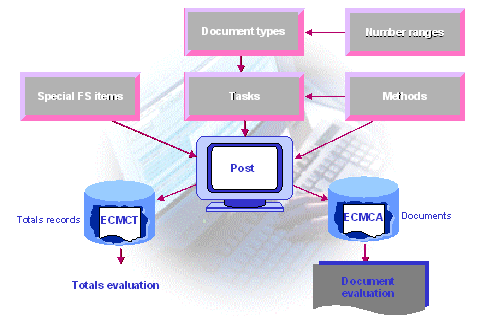
The following graphic shows the relationship between
the Customizing settings, which are necessary for postings
the posting itself
and the totals records and journal entries, which are generated during posting
 ( )
( )
Below the relationships which the graphic shows are explained in more detail, on the one hand for automatic postings and on the other hand for manual postings.
Automatic posting |
Manual posting |
||
Custom. |
Task |
For example for interunit eliminations |
For example for manual standardizing entries |
Assignment of a document type and possibly of a method |
|||
Document type |
Indicator Automatic |
Indicator Manual |
|
Settings for: Posting level, currencies to be posted, post deferred taxes to the credits, treatment of the subassignments and so on. |
|||
Assignment of number ranges with document number interval |
|||
Method |
You control in detail how the system creates postings with the method settings. For example you define in a method for interunit eliminations, which FS items sets should be eliminated against each other. Exception: The function elimination of interunit profit/loss in transferred assets does not know any methods. |
None. |
|
Selected FS items |
For both automatic and manual postings the system generates automatic line items for Financial Statement Imbalances, Deferred Income Tax and Consolidation Unit Balance Adjustment . So that the system can determine the FS items for these automatic line items, you define selected FS items. |
||
For automatic postings of consolidation of investments and elimination of interunit profit/loss in transferred assets, you define more selected FS items. |
|||
Post |
You run the tasks via the data/ consolidation monitor or via the detail menu. |
||
The system generates the posting automatically. |
In the Transaction for Manual Posting you enter the document header data and the document line item and post the document. |
||
Data |
The system creates data records to the totals database and journal entries to the journal entry database. You can evaluate this with reports and database listings. |
||
Reversal |
In the master data of view, you can define what should happen to the old documents when a task is executed again: These can be reversed or deleted. Therefore the reversing or deleting of automatically posted documents is only possible with the repetition of consolidation tasks. |
You can reverse documents individually, or use mass reversal. |
|
Note
To use the support of the system for the consolidation tasks, you should execute the tasks with automatic postings, as far as possible.