Activities in the Shop Workbench
The
Shop Workbench
can be used as an alternative to theOperation List
.Once an SFC number is displayed in the
Shop Workbench
, a production operator can select an operation node (level two of the tree) and perform a transaction upon the operation.The
Shop Workbench
can also be used as an alternative to certain POD plug-in lists.The production operator can select a node beneath the operation detail node (level three of the tree) and then choose the appropriate data entry POD plug-in button.
The following table shows the operation detail nodes and corresponding plug-in activities:
Shop Workbench Node
Activity
Action
Buyoffs
Processes the selected buyoff
Components
Displays the
Assembly Point
plug-in to collect component informationData Collections
Displays the
Data Collection Entry
plug-in to enter the DC parameter dataTools
Displays the
Log Tool Entry
plug-in to enter tool dataWork Instructions
Displays the
Work Instruction Viewer
and displays the selected work instruction
The operator can also select the SFC or an operation node on the Shop Workbench
tree, choose the Reports
button and select the desired report from the Reports list. For example, when the user chooses the Reports
button,
the selects the Activity Log Report
from the list and chooses OK
, the system displays the Activity Log Report
with the data for the selected SFC number.
The operator can also perform most activities including those assigned to the Activities
button. For example, when the user selects an operation node and chooses the Earned Standards
button, the Earned Standards
plug-in
appears with the SFC or operation’s standards.
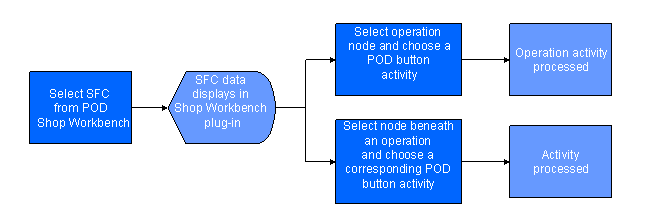
Process Flow
The following figure illustrates the primary flow of the user and system actions to perform activities in the Shop Workbench
: