 Processing Hierarchies
A hierarchy is a tree-like structure consisting of hierarchy nodes that is identified by its hierarchy name. The hierarchy type defines which objects can be used as nodes. The definition of the hierarchy type also includes whether hierarchies are edition-dependent, have versions, and are synchronized. Hierarchies allow you to structure related master data objects. They reflect business logic – for example, an airline logically belongs to an airline alliance.
The organization of consolidated, validated master data records in analytical hierarchies can help address business questions if you integrate the data with analytical applications or spreadsheets. For example, you can use the information gathered in SAP Master Data Governance to analyze revenue by airline alliance.
For more information on the configuration of hierarchies, see Configuring Hierarchy Types and Structure of the Data Model and Database Tables.
Assignment of Business Objects to Hierarchies
You can assign business objects to hierarchies in the following ways
Create or remove the assignments of just one business object to one or more hierarchies in
Single-Object Processing
(USMD_OVP_GEN
)For example, when you create or edit an airline in single-object processing, you can assign it to one or more airline alliances in a hierarchy.
For more information about the hierarchy assignment block in single-object processing, see Single-Object Processing.
Visualize and work with hierarchy structures in
Hierarchy Processing
(USMD_ENTITY
)In this application, you can add, move, and remove hierarchy nodes. You can also change hierarchy node attributes.
For more information about the
Hierarchy Processing
user interface, see Collective Processing.
File Upload and Download
You can upload and download hierarchies using the following Web Dynpro applications:
File Upload (
USMD_FILE_UPLOAD
)File Download (
USMD_FILE_DOWNLOAD
)
Validity Timeframes (Dependent on Configuration)
You can assign validity timeframes to hierarchies to make hierarchies time-dependent. You can use editions to schedule changes that apply from the valid-from date of an edition. For more information, see Using Editions to Schedule Changes.
Version-Dependent Hierarchies (Dependent on Configuration)
Hierarchies can be version dependent. These versions can be copied to another version.
If the Airline Alliances - Regional
hierarchy is version dependent, it can have a planning version and a current version. If it is not version dependent it can only have one version (see figure below).
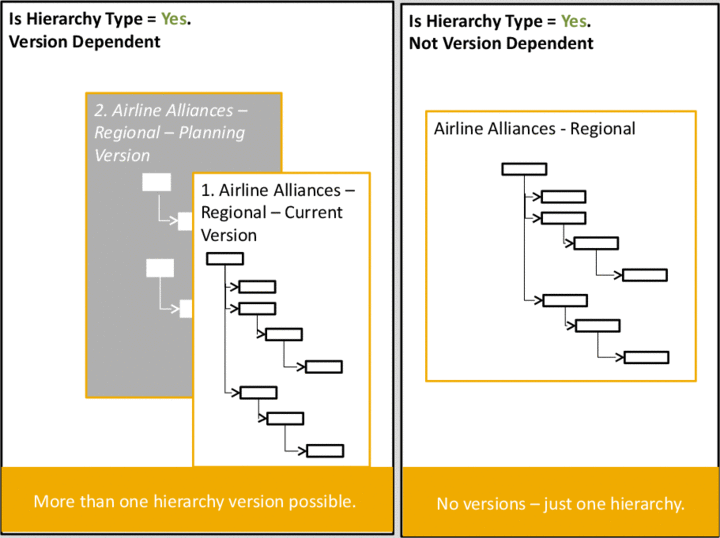
Version-Dependent Hierarchy Type
Synchronized Hierarchies (Dependent on Configuration)
Certain subhierarchies are customized to be synchronized in all hierarchies they belong to. For more information, see Configuring Hierarchy Types.
In the example below, you have configured the Airline
(CARR
) hierarchy type to be synchronized. Airlines are the main building block within airline alliances. As a result of airlines being synchronized across airline alliances, the addition of a new airline to subhierarchy 
Alliances Regional

EU
Oyster Airline Alliance
 is mirrored in subhierarchy
 Alliances - Tiers
Tier 1
Oyster Airline Alliance
. If the hierarchy type Airline
is not synchronized, no mirroring occurs (see figure below).
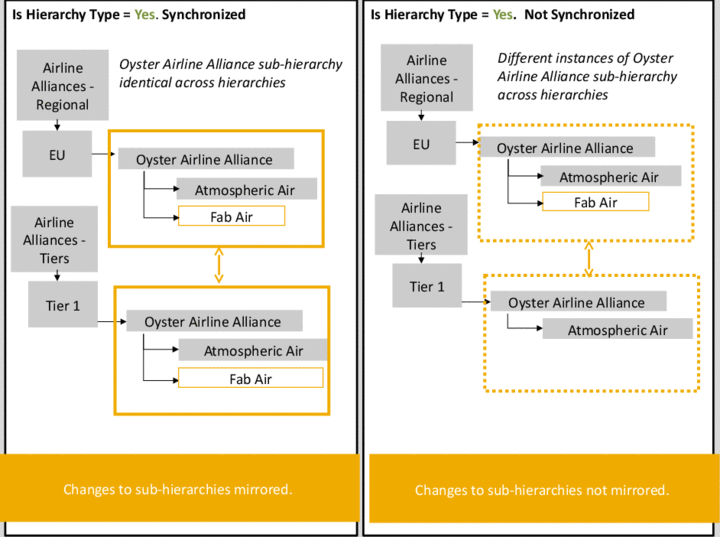
Use as Hierarchy Type Setting With and Without Synchronization
Process
For a description of working with Hierarchies in the Collective Processing
application, see Hierarchy Assignment in Collective Processing.
For a description of working with Hierarchies in the Single-Object Processing
application, see Hierarchy Assignments in Single-Object Processing