 MetaStar

Definition
A view of data that can be read from a specific data source in the R/3 System.

Use
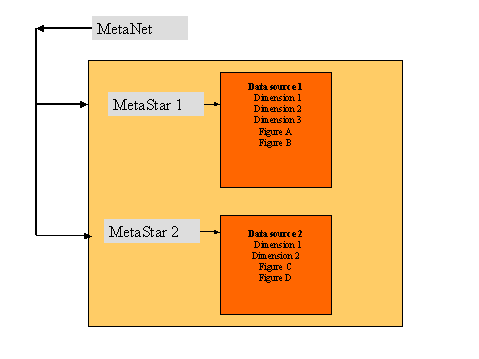
A MetaStar contains data and its system-related information. It groups information from the same business area. For example, one MetaStar can contain the payments and deductions of a payroll, while another MetaStar contains the data of an absence type. Different MetaDimensions are both meaningful and possible for each of these MetaStars. In the case of deductions, for example, the type of deduction could be taxes or benefits-related deductions, while in the case of absence types, you need to know when leave was taken and the amount with which it was paid.
The MetaNet and its MetaStars form the directory that contains all of the data for creating forms. After data has been selected from the MetaStar, an InfoNet and its InfoStars are used to make the data available to SAP Smart Forms for form processing.
Structure
A MetaStar contains MetaDimensions  (complete descriptions of business objects or
concepts) and MetaFigures
(complete descriptions of business objects or
concepts) and MetaFigures  (key
figures). The MetaDimensions contained in a MetaStar characterize the
MetaFigures of this MetaStar.
(key
figures). The MetaDimensions contained in a MetaStar characterize the
MetaFigures of this MetaStar.
In the overview tree of the MetaNet, a MetaStar is a node and represents the relationship between MetaDimensions and MetaFigures. The MetaStar is below the MetaNet in the hierarchy. It can also consist of MetaDimensions only.
Example From MetaNet SAP_DEFAULT
The
SAP_DEFAULT MetaNet  includes, for example, the PAYMENTS MetaStar . It contains information on:
· Bank details (account number, bank number, name of financial institution, etc.)
· The employee (name, personnel number, address, etc.)
· The in-period (start date, end date, payment date, etc.)
· The wage type (country grouping, wage type, long text, etc.)
