 Loading Appointments Originating in SAP Extended Warehouse Management
You can create transportation units (TUs) in SAP Extended Warehouse Management (SAP EWM) and the system automatically creates loading appointments for the deliveries in SAP Dock Appointment Scheduling.
Linking the loading appointments in SAP Dock Appointment Scheduling with the outbound deliveries in SAP EWM allows you to plan the overall workload of the warehouse more efficiently.
You can plan in this way for inbound appointments or outbound appointments. You can use this process to plan your deliveries internally in SAP EWM with rough specified times, which are then planned and confirmed with the carrier.
For outbound deliveries where you need to assign a staging area to the delivery early in the process, you can use a pick to stage process. For outbound deliveries where you do not need to assign a staging area to the delivery and can choose the door late in the process, for example, for bulk deliveries from a silo, you can use a pick to load process.
Prerequisites
You have checked that number ranges for loading appointment numbers and TU numbers do not overlap (see SAP Dock Appointment Scheduling).
You have created a docking location that is integrated with SAP EWM (see Docking Locations).
If you use a pick to stage process, you have assigned all doors in the staging area group to same loading point (see Integration with SAP EWM).
Process
Outbound Process – Pick to Stage
The figure below illustrates the process for an outbound loading appointment where you need to plan the staging area in advance of the arrival of the TU, and is followed by an explanation:
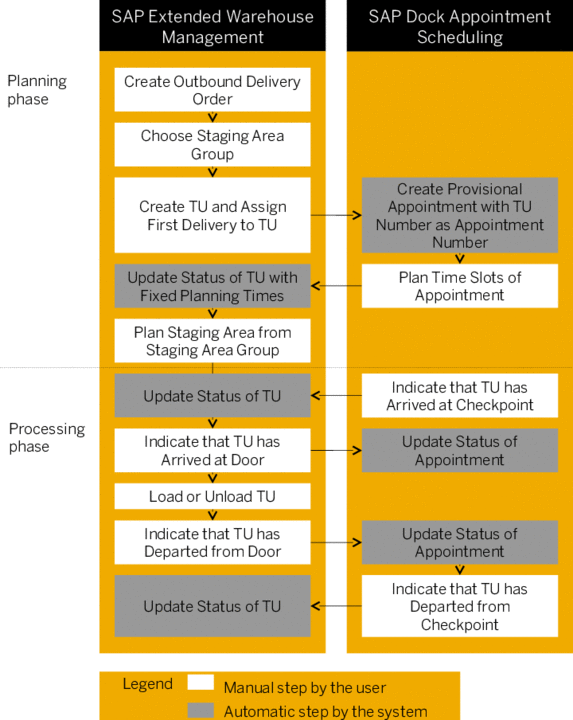
You create an outbound delivery order in SAP EWM and assign a staging area group to the delivery
You assign the first delivery to the TU.
The system automatically creates a provisional appointment for the TU in SAP Dock Appointment Scheduling. The provisional appointment does not include any information about the time slots of the loading appointment. The loading point that is connected to the staging area group assigned to the delivery is assigned to the provisional appointment.
You can update the details in the TU or assign new deliveries to it. The system automatically updates the loading appointment in SAP Dock Appointment Scheduling.
 Note
NoteIf you delete all the delivery assignments from the TU, the system deletes the related loading appointment.
End of the note.In SAP Dock Appointment Scheduling, you plan the time slots of the provisional appointment.
The system automatically updates the TU in SAP EWM with the appointment number, and time slots of the loading appointment. If you have entered a carrier, the system updates this information too.
The system updates the status of the TU to indicate that the planned times are fixed.
You pick the goods and bring them to the staging area.
When the vehicle arrives, you indicate that the vehicle has arrived at the checkpoint in SAP Dock Appointment Scheduling and assign it to a door.
The system automatically updates the status of the loading appointment in SAP EWM.
In SAP EWM, you indicate that the vehicle has arrived at the door.
The system automatically updates the status of the loading appointment in SAP Dock Appointment Scheduling.
You load the vehicle.
When the vehicle is ready to depart, you indicate that the vehicle had departed from the door.
The system automatically updates the status of the loading appointment in SAP Dock Appointment Scheduling.
You indicate that the vehicle has departed from the checkpoint in SAP Dock Appointment Scheduling and the system automatically updates the status of the transportation unit in SAP EWM.
Alternatively, you can indicate that the vehicle has departed from the checkpoint in SAP EWM and the system automatically updates the status of the loading appointment in SAP Dock Appointment Scheduling.
Outbound Process – Pick to Load
A pick to load process runs in the same way as a pick to stage process, but you do not plan for the staging area group. Instead, you plan the occupation of the door after the vehicle arrives. When the vehicle arrives at the checkpoint, you assign it to a free door. When the vehicle arrives at the door, you pick the goods and load the vehicle.
Inbound Process
You can plan inbound appointments in SAP EWM. For the inbound process, you plan the occupation of the door required for unloading after the vehicle arrives. When the vehicle arrives at the checkpoint, you assign it to a free door. When the vehicle arrives at the door, you unload it.
Result
You have unloaded or loaded the delivery, and the loading appointment is complete. You can now proceed with the delivery process in SAP EWM as usual.