Measuring Code Coverage in Overview
Here in overview is what you need to do to measure code coverage with the Coverage API.
We start with the steps required to use a standalone measurement, a measurement that is not part of a measurement series. After that, we review how to work with a measurement series.
Overview: Using a Code Coverage Measurement
-
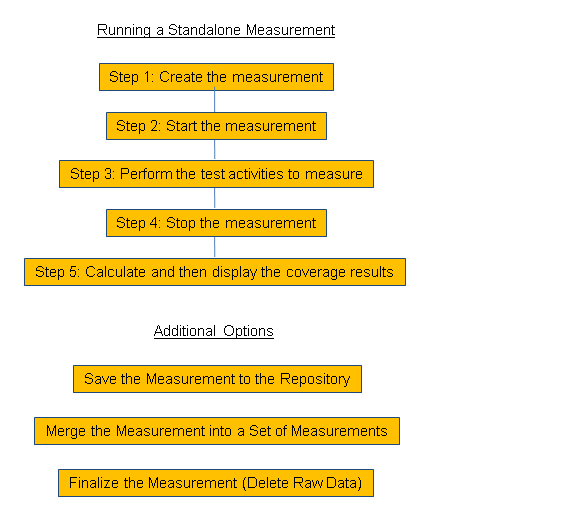
Create a measurement. Specify the users to measure if they are other than the current user. The SY-UNAME user is the default measurement user.
-
Start the measurement to record the activity of the specified users.
-
Perform the test activities whose code coverage you wish to record.
Models for interaction between the Coverage API and the code to be measured include the following:
-
You can use the API to instrument your test programs directly.
-
You can instrument the test infrastructure with which you are working. The infrastructure then turns code coverage measurement on and off as tests are run. (The ABAP Unit test infrastructure already offers integrated coverage measurement.)
-
You can start a measurement in a test system and let it run, so that it measures any and all activities of the measurement users.
-
-
Stop the measurement to end data collection and calculate results. You can calculate code coverage results only after a measurement has been stopped.
-
Calculate results for as many different programs, packages, application components, or selections thereof as you wish.
-
Extract the code coverage results in text form for reuse in e-mail or in reporting on code coverage.
You can also use the built-in graphical display of the Coverage API to look at the results.
If you have the test key of the measurement, then you can also display the results in the Details Display of the Coverage Analyzer, transaction SCOV. (Enter the test key as the Test group in the Details Display.)
-
If you wish to, you can save a measurement and its results to the repository of the Coverage API.
If you save the measurement in the started state, it remains running. All activity by the test users is recorded. You can then retrieve the measurement to stop it and calculate results. You can use this technique to record multiple disparate tests.
If you save a measurement after it has been stopped condition, then you can retrieve it to calculate additional results, as long as the raw data still exists.
You retrieve standalone measurements and results with the ID that the repository returns when you save the entities. Measurement series offer more comfort for retrieving measurements and results. We recommend measurement series if you plan to do systematic saving and retrieval for tracking coverage and other purposes.
-
If necessary, you can merge a set of measurements.
Let us say that you have measurements for two discrete tests that actually belong together. By merging the measurements, you aggregate them into a single new measurement. You can then obtain aggregated results from the merged measurement.
-
You can finalize the measurement, if you wish to delete the bulky raw data of the measurement.
The measurement itself and any results are not deleted. If you have saved them, then they disappear from the system only if you explicitly delete them. (Since they consume little storage space, it is not really necessary to reorganize and delete them.)
After the raw data of a measurement has been deleted, you cannot calculate any more code coverage results. You also cannot merge a measurement with another measurement (to aggregate their results).
The raw data of a measurement is deleted not only when you finalize the measurement but also when the raw data is reorganized automatically. Raw data is reorganized by default after one week, but you can set other retention intervals, if you wish. The raw data is also deleted when the source code of a procedure or processing block is changed either directly or through the arrival of imported code.
Overview: Using a Measurement Series
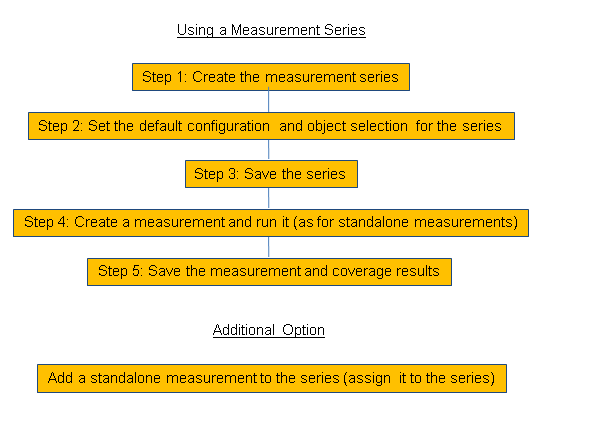
A measurement series is essentially a container for a chronologically ordered set of measurements. To set up a series, you do the following:
-
Create the series, giving it a name that is unique in the system. You retrieve the series for the next measurement and set of results using this unique name.
-
Set the default configuration and object selection for the series. The defaults are used automatically when you calculate code coverage results. The measurement users and server selection are also saved as defaults.
The defaults help you to create identically customized measurements in the series, so that the measurements can meaningfully be compared to one another. But you can override the defaults if you need to calculate differently customized results from measurements in the series. .
-
Save the series, which automatically saves the default configuration and object selection. After the first save, you need to load the series to use it.
-
Create a measurement in the series. The measurement life cycle in a series is approximately the same as that shown above for standalone measurements.
Measurement series are designed to work best with a single set of measurements, and not with several sets of measurements running in parallel in the series. But you can calculate as many results from each measurement in the set as you wish.
Series are also designed to have only one started measurement at a time. You may of course have several series with active measurements all running at the same time. The user restrictions and performance cautions shown above apply to active measurements in measurement series.
If you calculate more than one result per measurement, then it is wise to use a naming convention for the results. Then you can use the names to retrieve particular series of results.
-
Save the measurement(s) and results. Just save your results to also save measurements and the series to which they belong.
-
Optionally, you can add a standalone measurement to a series by assigning the measurement to the series.