 Installation Options
When you run a scenario based on SAP NetWeaver PI, multiple systems or applications (shortly referred to as application system or business system) communicate with each other using an interconnected system that hosts one or more runtime engines. Connectivity and message processing capabilities are technically based on the runtime engines. When you install SAP NetWeaver PI, you install one or more runtime engines on a host system. SAP NetWeaver PI provides different installation options, each of them offering different options for setting up the runtime engines.
Installation Options
Basically, you can install SAP NetWeaver PI in the following ways.
Installation Option |
Description |
Dual-stack installation |
Is technically based on both AS ABAP and AS Java and comprises the complete functional range of SAP NetWeaver PI. Provides tools for designing and configuring integration content (Enterprise Services Repository, Integration Directory and System Landscape Directory), as well as the following runtime engines:
More information: SAP NetWeaver PI Dual-Stack Installation |
Advanced Adapter Engine Extended (AEX) |
Is technically based on AS Java only. Provides tools for designing and configuring integration content (Enterprise Services Repository, Integration Directory and System Landscape Directory), as well as the Advanced Adapter Engine as runtime engine.
However, when using this installation option, the functional range of these tools is slightly restricted as compared to an SAP NetWeaver PI installation. End of the note.
In releases prior to SAP NetWeaver 7.3, an SAP NetWeaver PI installation was always based on both AS ABAP and AS Java (dual-stack). As of SAP NetWeaver 7.3, you have the option to choose an AS Java-only installation option, the AEX. End of the note. More information: Advanced Adapter Engine Extended |
 Note
Note
You have also the option to combine the Process Integration capabilities of the AEX with SAP NetWeaver Business Process Management by installing Process Orchestration.
For more information, see SAP NetWeaver Library at help.sap.com under  SAP NetWeaver Library: Function-Oriented View
  Process Orchestration
  .
.
 Caution
Do not mistake cross-component Business Process Management (ccBPM) for Process Orchestration.
Process Orchestration is based on AS Java only, and modeling is performed using the Process Composer. In contrast to that, ccBPM contains functions for enhanced service orchestration as part of a dual-stack SAP NetWeaver installation. It is based on both Application Server Java and Application Server ABAP. Modeling in the context of ccBPM is performed using the Enterprise Services Repository (based on integration processes as design time objects).
Runtime Engines
Depending on the used installation option, SAP NetWeaver PI provides the following runtime engines:
Integration Engine (IE) (only for dual-stack installation option)
Based in Application Server ABAP and contains the following adapters: IDoc (IE), XI (connectivity to proxy runtime), HTTP (IE), as well as the connectivity to systems or applications based on Web Services Reliable Messaging (WS channel).
Advanced Adapter Engine
Based on AS Java and provides the following adapters: RFC Adapter, SAP Business Connector Adapter, File/FTP Adapter, JDBC Adapter, JMS Adapter, SOAP Adapter, Marketplace Adapter, Mail Adapter, RNIF Adapter, CDIX Adapter, IDoc Adapter (AAE) (adapter type DOC_AAE), HTTP Adapter (AAE) (adapter type HTTP_AAE).
Business Process Engine (only for dual-stack installation option)
Based in AS ABAP and comes into play when you execute scenarios that contain integration processes (cross-component Business Process Management).
Connectivity Options
The following figure shows an overview of the available connectivity options for both dual-stack and AEX installation option.
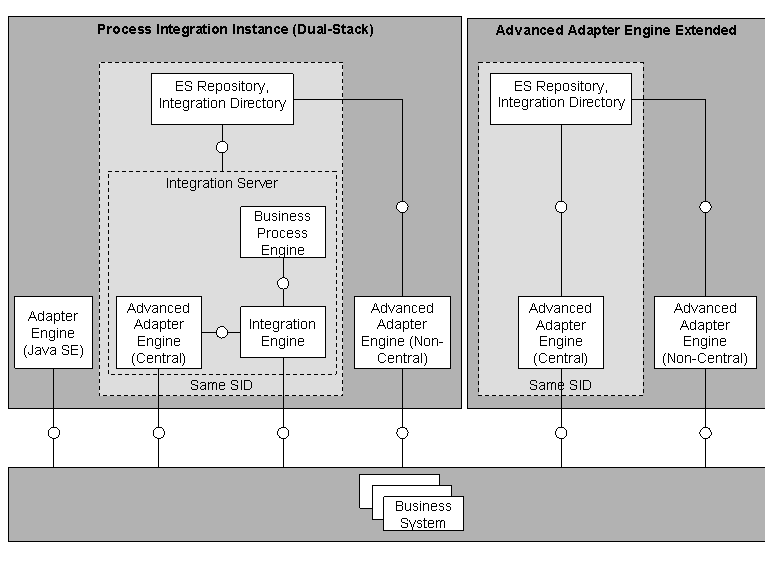
Connectivity Options of SAP NetWeaver — Dual-Stack and AEX