 Advanced Adapter Engine Extended
Features
The installation option Advanced Adapter Engine Extended (AEX) provides the connectivity capabilities of the Advanced Adapter Engine (AAE) as well as the design and configuration tools (ES Repository and the Integration Directory) to set up scenarios based on the AAE.
For a detailed view of the components of the AEX, see Architecture (Advanced Adapter Engine Extended)
Capabilities
AEX supports the mediation capabilities of the AAE. In particular, you can use the following adapters:
RFC Adapter
SAP Business Connector Adapter
File/FTP Adapter
JDBC Adapter
JMS Adapter
SOAP Adapter
Marketplace Adapter
Mail Adapter
RNIF Adapter
CDIX Adapter
IDoc Adapter (AAE) (adapter type IDOC_AAE)
HTTP Adapter (AAE) (adapter type HTTP_AAE)
More information on the individual adapters: Adapter Configuration (AAE)
 Caution
The RNIF and CIDX adapters, together with the corresponding business packages, allow you to set up business-to-business scenarios based on the corresponding industry standard (RosettaNet or Chem eStandards respectively).
More information: Setting Up Integration Based on SAP Business Packages
Note that when you have installed the Advanced Adapter Engine Extended (AEX), integration processes cannot be used. Therefore, those scenarios of the business package that use integration processes are not supported in this case.
Technically, the installation option AEX is based on AS Java.
 Recommendation
Since AEX is based on AS Java alone, it is easier to install and maintain as it needs less memory and data storage. Therefore, AEX is a cost-saving option compared to a full installation of SAP NetWeaver PI.
Caution
Compared to a complete SAP NetWeaver PI installation, AEX has the following restrictions:
The connectivity options are restricted to the adapters of the AAE.
This means that you cannot use the following adapter types: IDoc (IE), XI, HTTP (IE), WS (connectivity with systems based on Web Services Reliable Messaging).
 Note
NoteAlthough the XI adapter cannot be used with the AEX, you can configure connections based on the XI 3.0 message protocol using the SOAP adapter.
End of the note.You cannot use integration processes (cross-component Business Process Management).
You can only use process integration scenarios as a modelling option in the ES Repository.
ABAP mapping is not available.
You cannot use the Runtime Workbench for monitoring purposes.
Connectivity Options
The following figure provides an overview of the connectivity options of the AEX. Read the following subsections for more details.
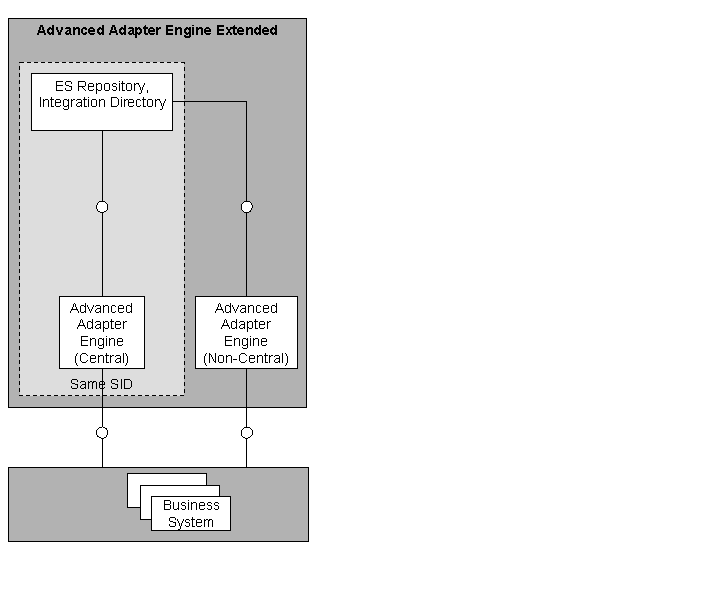
Connectivity Options of the AEX — Overview
Message Processing Using the Central AAE
As the standard connectivity option, you can use the Advanced Adapter Engine centrally, that means, installed on the same system ID (SID) where the design and configuration tools are also installed.
Using a Non-Central AAE as Part of an AEX Installation
You have the option to install a non-central Advanced Adapter Engine (non-central AAE) separately on a system with a different SAP SID than the central AAE. At runtime, the non-central AAE works independently of the central one.
The design and configuration environment (ES Repository and Integration Directory) resides on the server of the central AAE. Both central and non-central AAE register themselves at the same System Landscape Directory (SLD).
With regard to user management, the non-central AAE works completely autarkically, because it uses a local User Management Engine.
The following figure illustrates the setup.
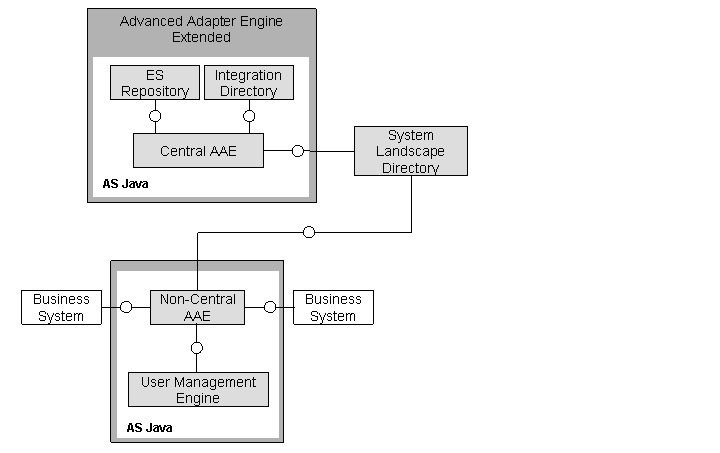
Non-Central AAE as Part of an AEX Landscape
Note
Note the following characteristics of the usage of a non-central AAE in an AEX installation:
You configure the non-central AAE using the Java Service Properties in SAP NetWeaver Administrator.
You cannot set up scenarios where an Integration Engine is involved in the communication.
Use Cases
You can use AEX in the following ways:
Using AEX standalone
Using AEX in combination with an additional SAP NetWeaver PI landscape
Using AEX Standalone
You can use AEX standalone as integration middleware. The basic communication options are illustrated in the following figure:

Using AEX Standalone
This use case is suitable in the following situations (examples):
Using AEX as “lightweight” and low-cost integration middleware
For scenarios that require only connectivity capabilities provided by the AAE and that do not contain any integration processes (cross-component BPM), you can choose the installation option AEX, which is technically based only on the AS Java. In former releases, a standard installation of SAP NetWeaver PI (technically based on both AS Java and AS ABAP) was required for such scenarios.
Using AEX as a test environment
Since an AEX installation provides not only a runtime engine (Advanced Adapter Engine) but also the ES Repository and the Integration Directory, it supports the complete lifecycle of an integration project. Therefore, you have a complete and consistent toolset to set up, configure, and test integration scenarios in your landscape.
NoteNote that AEX only provides a restricted functional range compared with an SAP NetWeaver PI complete installation. In particular, you cannot test integration processes (ccBPM) with this setup.
End of the note.Using AEX as a fail-over system
You can transport complete integration scenarios (integration content from the ES Repository) as well as the configuration content (Integration Directory) from a productive landscape (for example based on an SAP NetWeaver PI standard installation) to a “fail-over landscape” based on AEX. Note that this transport option is restricted to those Integration Directory objects that are supported by AEX, for example integrated configurations.
Using AEX in Combination with an Additional SAP NetWeaver PI Landscape
You can connect your AEX-based landscape to a landscape that is based on SAP NetWeaver PI. The basic communication options are illustrated in the following figure:

This use case is suitable in the following example situations:
Separating network zones
For example, you can set up a landscape based on an SAP NetWeaver PI standard installation for your security-critical scenarios. You can add an AEX installation in your demilitarized zone (DMZ) that is used for the external communication. Between the AEX in the DMZ and the “PI standard system”, you can easily configure a change of transport protocol in order to provide maximum security.
Separating landscapes for different regions of an enterprise
For example, you can use landscapes based on AEX as a cost-saving integration solution for the regional business processes and a PI standard installation for the central processes of an enterprise.
Caution
When you use AEX in combination with a landscape based on an SAP NetWeaver PI standard installation, you need to carefully consider all implications also in the case of federated PI landscapes. For example, the content of the individual ES Repositories (installed with the AEX on one hand and with the standard PI system on the other hand) is not aligned automatically, which means that suitable transport scenarios have to be planned.