 SAP NetWeaver PI Dual-Stack Installation
This section provides an overview of the different options for processing messages at runtime with an SAP NetWeaver PI dual-stack installation.
Connectivity Options
The following figure shows an overview of the connectivity options of a dual-stack SAP NetWeaver PI installation. Read the following sub sections for more details.
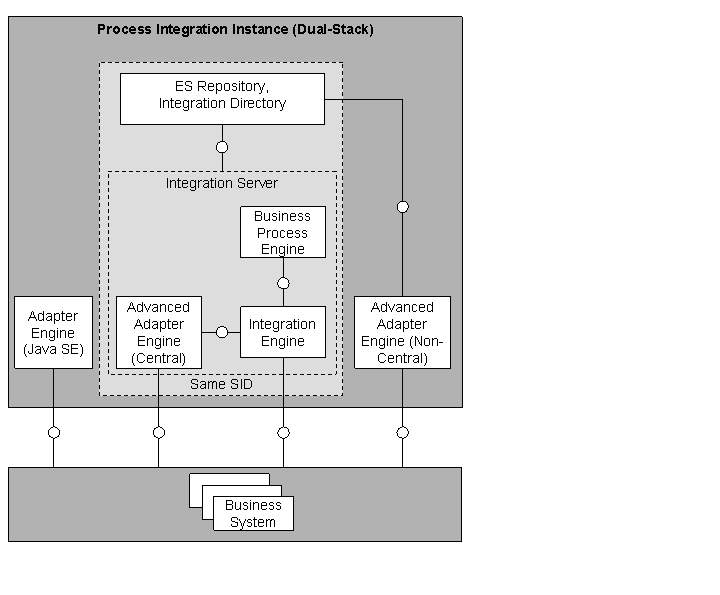
Connectivity Options of SAP NetWeaver PI (Dual-Stack) — Overview
Dual-Stack Message Processing
Using this connectivity option, both the Integration Engine (IE) and the Advanced Adapter Engine (AAE) are involved for message processing at runtime. In case you have configured integration processes, also the Business Process Engine is involved.
Adapters run either on the Integration Engine or the AAE. The following adapters run the Integration Engine: IDoc (IE), XI, HTTP (IE), WS (connectivity to systems based on Web Services Reliable Messaging). All other adapters run on the AAE. In which way the IE and AAE are used in particular, depends on the configured adapters for inbound processing (connectivity to a sender system) and outbound processing (connectivity to a receiver system).
 Example
For example, in case a JDBC (sender) adapter is used for inbound processing, the AAE is involved in the communication to provide the required connectivity to the sender system.
The following figure illustrates this situation for the case where the AAE is connected upstream to the Integration Engine (providing the required connectivity at sender side):
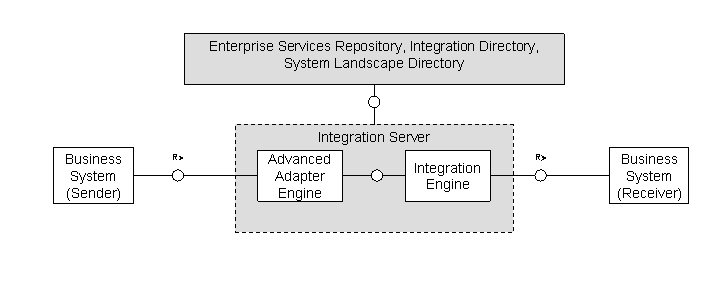
Integration Engine-Based Communication Including the AAE at Sender Side
Local Message Processing Using the AAE
You can also process messages “locally” on the AAE without involving the IE. This option ensures a considerably higher performance. However, there are some restrictions regarding the mediation capabilities compared to scenarios with full involvement of the Integration Server. For example, the “WS adapter” cannot be used. The following figure illustrates local message processing on the AAE:
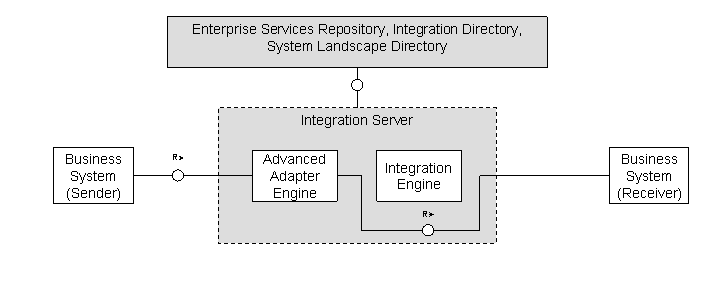
Local Message Processing on the AAE, Bypassing the Integration Engine
In the figure it is also illustrated that besides the fact that the IE is “bypassed” at runtime, the design and configuration time tools are still needed to set up the communication.
If at runtime dual-stack or local (AAE-only) message processing mode is used, depends on which configuration objects you have specified in Integration Directory.
In general, the following applies:
If you use sender agreements, receiver determinations, interface determinations and receiver agreements as configuration objects, messages are processed in the dual-stack mode.
If you use an integrated configuration as configuration object, messages are processed in the AAE-only processing mode.
Which adapters are involved for inbound and outbound processing in particular, depends on the assigned communication channels.
Message Processing Using the Non-Central AAE
In addition to using the AAE as part of the Integration Server (the central Adapter Engine), there's also the option to use the AAE stand-alone, next to the Integration Server (non-central AAE). That means, the AAE can be installed on a system with a different SAP system ID (SID) than the Integration Server and be used as an independent integration hub. However, note that you need an ES Repository and an Integration Directory as design and configuration tools in order to set up the scenarios.
The following figure shows the basic communication flow at runtime:
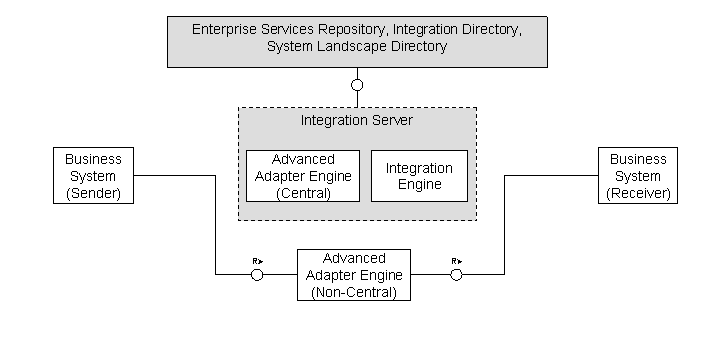
Message Processing Using the Non-Central AAE
 Note
Note
As an additional option, you can use the Adapter Engine (Java SE). This option is only supported for compatibility reasons. It hosts only a subset of the adapter functionality and has fewer security and monitoring features.
More Information
Architecture (PI Dual-Stack) (for a detailed view of the components of a dual-stack SAP NetWeaver PI instance)
Message Processing at Runtime (for information on how message processing is performed in detail)