 Cross-System Processing
You can use Postprocessing Office across multiple logical systems. This means across more than one system and/or client. In your logical system, you can display and process objects as well as postprocessing orders from other logical systems.
Process
Setting up Logical Systems
Define the external clients and/or systems for which you want to process postprocessing orders and/or objects in your logical system (see Defining Logical Systems).
Assign the corresponding RFC destinations (see Assigning Logical Destinations to Logical Systems).
Specify which employees to be authorized for cross-system processing (see Defining Users).
Connecting Software Components
This step is not required if the software component is already connected to the Postprocessing Office in the standard system.
If the software components are not yet connected to Postprocessing Office, note the following cases:
For more information, see Connecting Software Components.
Case 1: Cross-system processing with cross-system software component

To process postprocessing orders or objects from another logical system (system B) while in your logical system (system A), and if these belong to a software component that is in system A and system B, you need to connect the software component in both systems to the Postprocessing Office. This enables you to process the postprocessing orders and objects from system B while in system A, or vice versa, with no restrictions.
Case 2: Cross-system processing with an internal system software component
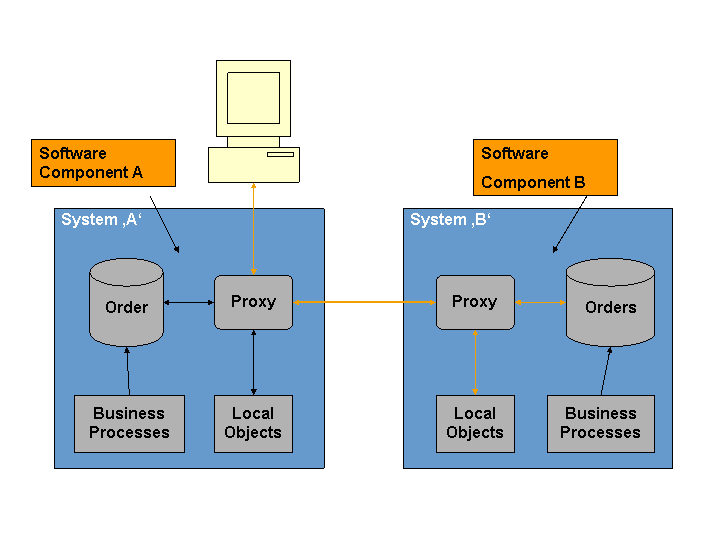
To process postprocessing orders or objects from system B while you are in system A, and if these belong to a software component that is only in system B but not A, you need to connect the software component in system B to the Postprocessing Office. This enables you to process the postprocessing orders and objects in both systems, but in system A this is only possible with restrictions.
Setting Up Worklists
To process postprocessing orders or objects from system A while you are in system B, create worklists for the required software components in system A in Customizing for Postprocessing Office under
 Worklist
  Define Worklists.
  You can assign business processes in Case 1 only.
 Assign the worklists with organizational units and/or users who have authorization for cross-system processing (see Changing Worklist Assignments).
Result
You can display and process postprocessing orders and objects from other logical systems.
Example
The cross-system use of Postprocessing Office can, for example, be useful in the following cases:
Postprocessing orders from other logical systems contain information that is relevant for processing the postprocessing orders in your logical system. Therefore, you want to be able to include this information when you process your postprocessing orders or when you process postprocessing orders from the other logical system while you are in your logical system.
You want to use a logical system centrally for Postprocessing Office and from there process all postprocessing orders from all logical systems.
In your logical system, you want to generate postprocessing orders for BOR object types that originally come from another logical system.