
 Event Reporting

Purpose
By reporting events you can:
● Forward information in a timely way to all partners involved in the business process
● Check if planned or agreed deadlines have been met, and if so how
● Document the business process
Prerequisites
● You have defined the business process types and event handler types in Customizing.
● You have defined an expected event profile in Customizing for each event handler type.
● You have defined a rule set in Customizing for each event handler type to check event messages.
● You have checked if a means already exists to report events, or if an appropriate interface must be implemented.

You have an existing EDI system and an EDI converter that can send IDocs, for example.
● You have defined the internal event codes in Customizing.
If your partners use external event code sets and event codes, you can define the way in which SAP Event Management (SAP EM) maps the external events codes onto internal ones.
Process
...
1. You (as an employee, service provider or partner, for example) report an event to SAP EM.
2. You specify the external event code consisting of an event code set and an event code ID.
3. You specify the tracking ID.
4. SAP EM receives the event message and prepares it for additional processing (for example, checks the validity of the event message).
The following figure provides an overview of the standard process flow:
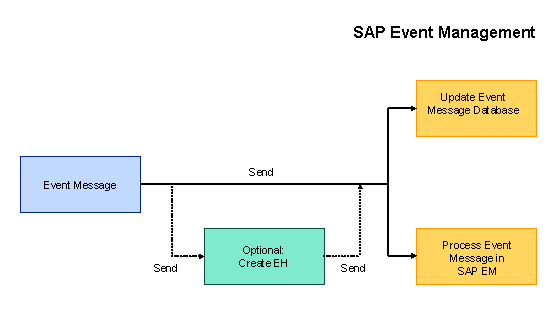
For more information about the process flow in SAP EM, see Inbound Event Message Processing and Event Message Processing.
Means of Communication for Reporting Events
You can use various means of communication to report events:
● Direct input in SAP EM
● Transfer from the application system
● Input in the Internet
● EDI
● XML
● Language recognition
Result
SAP EM receives the data. It processes this data and reacts in accordance with the activities defined in the rule set (for example, sends an e-mail or updates the data in the shipment document in the application system).