
 Internal Event Code and External Event
Code
Internal Event Code and External Event
Code

Definition
The event code is a joint term for the event code set and the event code ID. SAP Event Management (SAP EM) differentiates between the internal event code and the external event code.
Internal Event Code
The internal event code displays the internal type of the event for an event message. The internal event code makes it possible for SAP EM to display the external event code in a standardized way.
You specify the internal event code in SAP EM.
An external event (for example, delivery arrival) is mapped onto an internal event code (for example, PUAR).
External Event Code
The external event code displays the event type for an event message.
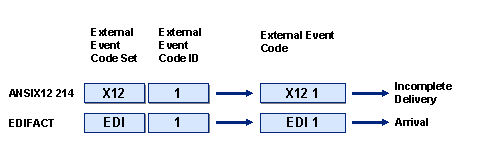
You specify the external event code in SAP EM. It corresponds to the industry standard codes, such as ANSI X12214 status code, RosettaNet, or CLM code.
The following figure provides an example:
Use
The event codes identify the event that has occurred and that is to be updated in SAP EM.
SAP EM needs internal event codes to:
· Create a list of expected events for an event handler
· Find the corresponding expected event when an event message is sent and thereby check the planned and actual data
You use external event codes so that your business partners can still use their event codes (for example, EDI standard code).
Mapping External Event Codes onto Internal Event Codes
...
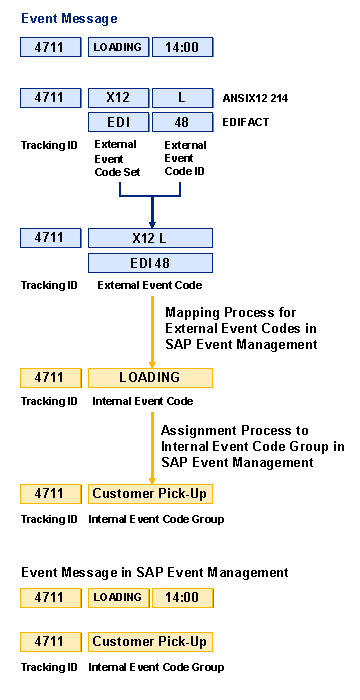
1. You send an event message with an external event code to SAP EM.
2. SAP EM maps the external event code onto the internal event code in accordance with Customizing.
3. If you have defined internal event code groups, SAP EM assigns the internal event code to the appropriate internal event code group.
The following figure provides an overview of mapping external event codes onto internal event codes:
Example
...
1. You specify the following expected events for a sales order:
¡ Picking
¡ Packing
¡ Departure
¡ Arrival at Customer
2. You specify the following internal event codes for your expected events:
¡ PICK for picking
¡ PACK for packing
¡ DEP for departure
¡ ARRCUST for arrival at customer
3. You specify the external event code set CAR1 for your service provider with external event code IDs:
¡ 001 for picking
¡ 010 for packing
¡ 030 for departure
¡ 110 for arrival at customer
4. You specify how the external event code IDs are mapped onto the internal event codes.
5. You report the event picking to SAP EM either with the internal event code PICK or with the external event code ID 001.
See also: Event Message Processing.