 Using the Help Center as an Information Source for Applications
The Help Center provides you with information about an SAP application. You can call it while working with an application, regardless of whether the application is running in a SAP GUI, browser, portal, or Business Client.
Help Center Content
The Help Center of an application can contain the following types of content:
User-specific: You can use the note editor to save and manage your own information. Your notes can only be viewed by you.
Company-specific: Process experts in your company can provide the information you need to work with the application. This includes:
Frequently asked questions
Links to files and Web pages
SAP-specific: You can call the help assigned to the application (from the installed SAP Library) by using a link in the Help Center.
Search Function
The Help Center search function helps you to find content that is assigned to the current application in the Help Center. You can also search the Help Center content of related applications by extending the search area.
Help Center Overview
The following figure shows the structure of the Help Center and the content provided. Your administrator can change the number and order of Help Center sections if necessary.
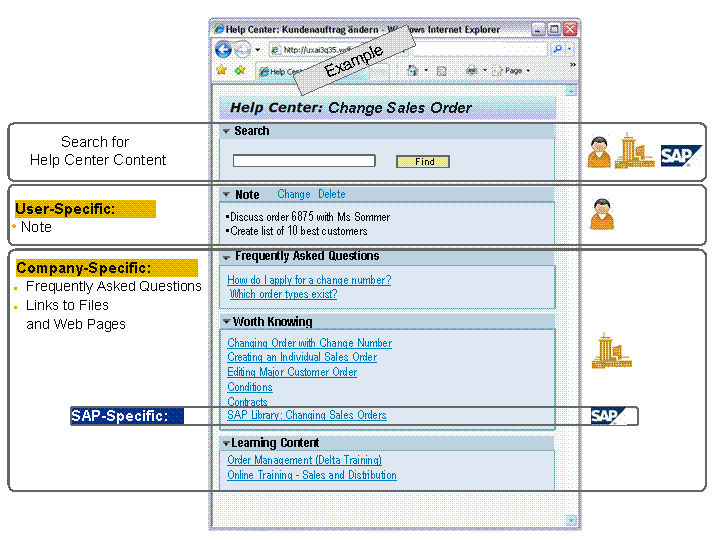
Information in the Help Center of an Application (Example)
Procedure
Launch the Help Center of the application.
More information: Launching the Help Center
Use the methods for finding information in the Help Center that suit your requirements.
Use the Help Center editor to make a note of information that you need to work with the application.
More information: Creating and Managing Your Own Notes in the Help Center
Check the frequently asked questions and, if necessary, open the relevant answer.
More information: Using Answers to Frequently Asked Questions
To open the documents, figures, recordings, and training material that explain the tasks you need to perform in the application, use the links in the Worth Knowing and Learning Content sections.
More information: Using Links to Information in the Help Center
Call the application help provided by SAP.
More information: Calling the Application Help in the Help Center
Search the Help Center content to find the information you need.
More information: Searching for Help Center Content