
 Configuring B2B Scenarios

The integration scenario configurator supports the configuration of business-to-business(B2B) processes.
B2B Communication
In a B2B scenario, a minimum of two parties communicate with each other. The internal system landscapes of the parties are only made partially public or not at all. The parties communicate using business services.
When you design an integration scenario, you can predefine B2B communication by classifying an application component as an External Party with B2B Communication (a B2B component for short). All connections to and from a B2B component are known as B2B connections.
In the graphic below, B2B communication between two communication parties is shown schematically:
B2B Communication Between Two Parties
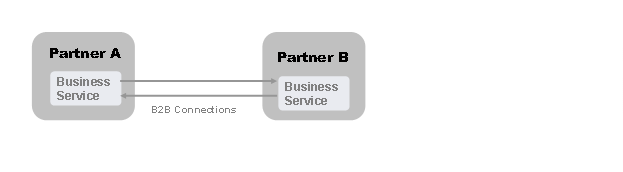
The integration expert configuring the integration scenario for party A only has access to the details of party A’s internal system landscape. Therefore, he can only define services for business systems and integration processes from this part of the system landscape. He does not have access to details about the internal system landscape of party B. The situation is the opposite for an integration expert who configures the integration scenario at party B (see figure under Configuring Cross-Company Processes).
Configuring B2B Scenarios Using the Integration Scenario Configurator

Below are the steps that need to be performed at party A to configure the B2B scenario.
When designing the integration scenario that you are using as a configuration template, you must have predefined B2B communication as a B2B component by creating an application component.
Perform the following steps in the integration scenario editor:
Assigning Services
When assigning the service for the application component of party A
· First assign the services for the internal systems (business systems and integration processes) that are responsible for the processing of the messages (tab page Business System Services for A2A)
· Determine the business services to be used for B2B communication with external party B (tab page Business Services for B2B).
These business services are “visible” to party B.
· Assign the services that were defined for the internal systems (business systems or integration processes) system 1…n to the business services (at party A) (tab page for Business Services for B2B).
If any business services are missing, you can create them directly when assigning services.
Configuring B2B Connections
Senders and receivers are connected by joining together their respective business services when configuring the B2B connection.
The communication channels at the sender and receiver must be defined to define the technical details of message exchange. If, in the integration scenario used as the template for configuration, communication channel templates are assigned to a connection, they can be used to create new communication channels. You can reuse or copy existing communication channels.
Generating the Configuration Objects
The following B2B-specific settings are preconfigured when generating the configuration objects:
· The receiver determination with sender party B also contains party A’s business service as a virtual receiver in the key. The services that were defined for the internal systems (systems 1...n) are also entered as assigned receivers. At runtime, the messages sent from party B to party A's business service are also forwarded to the internal systems 1...n by means of receiver-dependent routing.
You must create the routing conditions for the assigned receiver manually after generation is complete.
· A header mapping is predefined in the receiver agreement that defines the outbound processing for the message for party B as the receiver. The header mapping maps the services of the internal systems 1...n to party A’s business service. Therefore, party A’s business service is entered as the sender in the header of the messages sent from the internal systems 1…n to party B.
You can use the integration scenario configurator to configure both party-integrations (B2B connections) and connections between internal systems.