
 Configuring Cross-Company
Processes
Configuring Cross-Company
Processes

This section provides an overview of the most important concepts relating to the configuration of cross-company processes (or business-to-business (B2B) processes) in the Integration Directory.

B2B configurationwill be mentioned again below.

Note that the details of the configuration depend on the underlying process and the specific system landscape and are much more extensive than described here. This section merely contains an overview of the most important concepts.
For detailed information, see the description of the individual configuration objects.
Special Concepts
B2B configuration is done in the Integration Directory. It generally involves using the same configuration objects that you use for configuration of internal communication.
One special aspect of B2B configuration is that the business partners involved in B2B processes do not usually make information about their own internal system landscape openly available. The configuration of a B2B process takes places in the different Integration Directories for each of the companies involved and is based on complementing component views. Each company just configures the part of the system landscape that is relevant to them. (This is done in the Integration Directory.) The process can only be executed when all business partners involved have fully completed their configuration.
To explain the concepts that are specific to cross-company communication, we use a simple example where two companies A and B are involved in a cross-company process. Therefore, an integration expert making the configuration settings for business partner A can only make the configuration settings for internal communication for the part of the system landscape that he knows. The same is true for the integration expert responsible for the configuration at business partner B. This is illustrated in the following graphic:
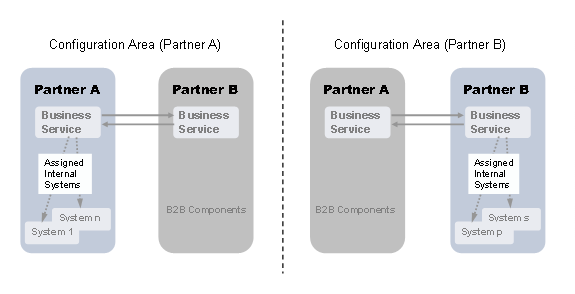
Mirror-Image Situations of B2B Configuration for Two Business Partners
The following table provides an overview of the concepts of B2B configuration, as seen by one of the two integration experts, for example partner A.
Concepts for B2B Configuration
Relevant Configuration object |
B2B-Specific Concepts |
Using a communication party, you address a company that is involved in a B2B process. The (technical) name of the communication party (for example Bosch) is the identifier for the company within an Integration Directory. To be able to identify the company during any external communication using a globally unique ID, you specify alternative identifiers for a communication party. For external communication, the name of the communication party that is known internally is mapped to the ID. A particular identifier is specified in the communication channel (see below). |
|
Business partners involved in cross-company processes do not generally publish the names of their internal business systems (and integration processes), but instead mask them using business services. Business services represent the internal system landscape externally. |
|
In addition to the configuration of the adapter, you specify in the communication channel which of the alternative identifiers (see above) provided for the communication party is to be used in a particular communication step. |
|
An external business partner, partner B, cannot send a message directly to an internal business system in the system landscape of partner A. The configuration of partner B specifies that the message to the communication party and business service published by partner A is addressed. Partner A must specify in its configuration settings that the message sent by partner B is to be forwarded to the relevant business system of its internal system landscape directory (or integration process). This is specified by defining a receiver-dependent receiver determination. Partner A defines the receiver determination depending on the party and business service it published. Under Configured Receivers, he specifies the business systems (or integration processes) to which the message is to be forwarded.
If you know your business partner well and want to make your internal landscape visible to him, you can do so. In this case, the business partner can address the message directly to an internal system from your system landscape and you do not need any further routing. However, note that such a close coupling with the business partner means that the configuration of the cross-company communication is affected each time you restructure your internal system landscape. |
|
To mask parts of the system landscape by using a business server, partner A defines a header mapping. The header mapping ensures that the name of a business service (and not the business system or integration process service) is written in the header of the outbound message. Note that the configuration of B2B processes typically demands high message security requirements. With some adapter types you can configure security settings for outbound messages (such as settings for signing messages). |
|
With some adapter types you can configure security settings for inbound messages (such as check and decryption certificates).
Messages from business partners are usually signed and encrypted. |
See also:
For more information about configuring cross-company processes based on an integration scenario, see Configuring B2B Scenarios.
Security Settings
When configuring B2B processes involving the use of special adapters, you can make the following security settings:
Security Settings for B2B Configuration
Adapter Type |
Security Settings |
XI Adapter |
· Sign/Validate · Encrypt/Decrypt See: |
SOAP Adapter |
· Like XI adapter · In addition, you can specify the security standard to be used for signing/verifying the message (defined by the OASIS Web Service Security version). See: |
RNIF Adapter |
· Sign/Validate · Encrypt/Decrypt · Non-Repudiation of Receipt Acknowledgement/Origin and Content |
CIDX Adapter |
· Sign/Validate · Encrypt/Decrypt · Non-Repudiation of Receipt Acknowledgement/Origin and Content |
Mail Adapter |
· Sign/Validate · Encrypt/Decrypt Message security is based on the S/MIME Internet standard (Secure Multipurpose Internet Mail Extension). See: |