 Configuring Digital Asset Management
Digital Asset Management (DAM) is delivered with the Business Package for SAP CRM 2007 and contains all functions required to manage digital assets. After installment of the business package, the DAM functionalities are not yet available and you must first activate and modify them. The following procedure describes the steps necessary to activate DAM and the settings you make to modify the functionality to meet your requirements in the project.
For more information about DAM features, see SAP Help Portal at  http://help.sap.com
  SAP Business
Suite SAP Customer Relationship Management
SAP CRM 2007 (6.9) SP02 Application
Help SAP Customer Relationship Management
Components and Functions Marketing
Digital Asset Management
SAP Business
Suite SAP Customer Relationship Management
SAP CRM 2007 (6.9) SP02 Application
Help SAP Customer Relationship Management
Components and Functions Marketing
Digital Asset Management  .
.
Prerequisites
To be able to configure and use DAM, the following prerequisites must be fulfilled:
You have installed the system landscape corresponding to the business package.
For availability information, see SAP Help Portal at
http://help.sap.com SAP
Business Suite SAP Customer Relationship Management
SAP CRM 2007 (6.0) SP02 Application
Help SAP Customer Relationship Management
Business Package .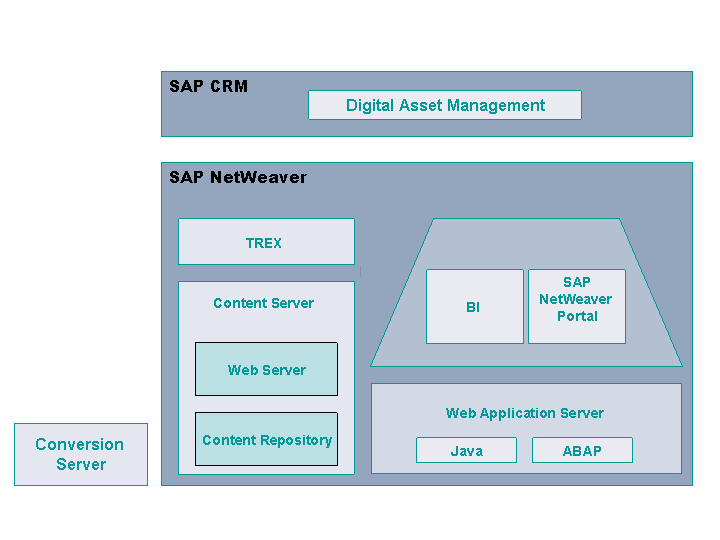
To be able to use the conversion functions, you require either SAP IGS or the Adobe Graphics Server. For more information about the Adobe Graphics Server, see Adobe athttp://www.adobe.com.
For data persistence, we recommend that you install the SAP Content Server. For more information, see SAP Service Marketplace at
http://service.sap.com/instguides SAP
NetWeaver SAP NetWeaver 7.0 (2004s)
Installation 3 — Installation
— Standalone Engines Installation — Content
Server 6.40 .You have installed JAVA Virtual Machine 1.3 or higher on the client so that you can upload multiple files directly.
A business partner must be assigned to each DAM user in the CRM system.
Activities
The following documentation explains the steps you must take to configure DAM. The steps are divided up as follows:
-
Activation describes what you must do to activate DAM.
Settings in the CRM
Settings in the portal
-
Configuration includes all points you need to modify DAM to your needs via Customizing and the portal.