Features
The budget posting approval process determines which status flow
is followed for budget postings.
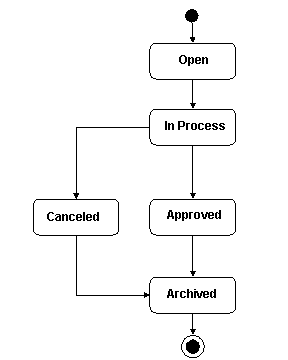
Budget posting statuses with the manual approval process are shown
below.
Budget posting status with the rule based approval are shown below.
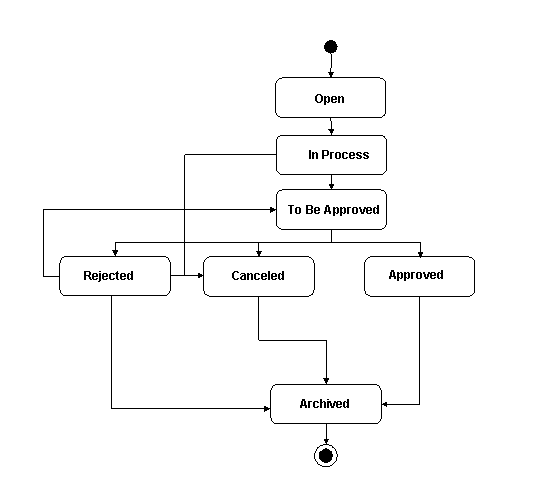
The following table identifies the budget posting status' and their
effects.
Status
|
Status Description
|
|---|
Open
|
Initial status when a budget posting is created.
All fields are still modifiable and you can delete the budget posting.
There is no communication to SAP NetWeaver Business Intelligence
(SAP NetWeaver BI).
|
In Process
|
Status is set automatically after the initial save.
Budget posting has not been posted (no fund posting has been created).
All editable fields can be changed.
Object can be deleted.
|
To Be Approved
|
Status is set manually (may trigger a workflow to start the approval
process).
Only the status can be changed.
Status can be changed by the person who created the posting or
by the person responsible (determined by the workflow).
Object cannot be deleted.
If the budget is reduced, this amount is blocked (a fund posting
is created for the value category pending budget reduction).
|
Approved
|
Depending on the corresponding customizing, the status is set automatically
or by the responsible user (determined by the workflow).
Nothing can be changed anymore.
After the approved status is saved, the fund posting is created
or updated (if there was a pending budget reduction before) and the budget
is posted to the corresponding fund(s).
|
Rejected
|
Status is set manually by the person responsible (determined by
the workflow).
After save status is Rejected.
Budget posting has to be changed by the original creator and can
be sent again for approval or can be canceled.
Object can be changed.
Object cannot be deleted.
Any pending budget reductions are removed/updated.
|
Canceled
|
Status is set manually
Any pending budget reduction has to be removed/updated.
Budget will not be posted to the corresponding fund(s).
Object cannot be deleted.
|
 Budget Posting Status Management