
 Using the Data Mart Interface
Purpose
If you want to define a BI System that is already in existence as a source system, access the functionalities of the data marts.
Process Flow
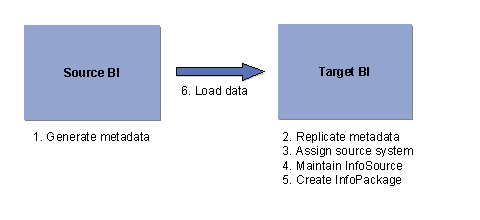
1. In source BI
Before a BI System can request data from another BI System, it must have information about the structure of the data to be requested. To do this, you have to upload the Metadata from the source BI into the target BI.
You can generate an export DataSource for the respective InfoProvider in the source BI. This export DataSource includes an extract structure, which contains all the characteristics and key figures of the InfoProvider.
For InfoCubes/DataStore Objects: See Generating the Data Target Export DataSource
For InfoObjects, see Generating the Master Data Export DataSource.
2. In target BI
...
1. Define the Source System. This is only necessary if the source system has not yet been created in the target BI.
2. If required, create an InfoSource (You can also allow the system to generate an InfoSource, refer also to point 4) and perhaps additional InfoProviders as well.
3. Copy the Metadata from your export data source from your source BI into your target BI. You can replicate all the metadata of a source system from the source system tree, or only replicate the metadata of your InfoSource from the InfoSource tree.
Also refer to Metadata Upload for SAP Systems.
a. In the context menu of your InfoSource, choose Assign DataSource if you only want to copy the metadata for your InfoSource.
b. Specify your source system.
c. From the subsequent dialog window, select your DataSource.
4. Assign your InfoSource to your export DataSource using the context menu in the DataSource tree.
Also refer to Assigning DataSources to InfoSources and Fields to InfoObjects
You can adopt the InfoSource suggested by the application. In this case, an InfoSource is generated or an InfoSource that you created is specified.
5. Create transfer rules for your InfoSource. This function can be found in the context menu in the DataSource tree and also in the InfoSource tree.
6. Go into the InfoSource tree, if you are not already there, and create an InfoPackage for your source BI under your InfoSource.
Also refer to Transaction Data Transfer for the Data Mart Interface and Text and Hierarchy Transfer for the Data Mart Interface.

If your InfoSource was generated by the system, it is possibly not yet displayed in the InfoSource tree. In this case, you need to display it using Settings ® Display Generated Objects in the main menu.
7. Schedule the InfoPackage.
Result
You have loaded data from one BI system into another BI system.