
 Location Determination in the Sales
Order
Location Determination in the Sales
Order 
Use
When an item relevant for the availability check is entered in a sales order in CRM Enterprise, depending on the system you use as an ATP system – location determination is performed automatically either in SAP Advanced Planning and Optimization (SAP APO) or in SAP R/3 Enterprise. After the location (delivering plant) has been determined in the ATP system, it is transferred to the sales order in CRM Enterprise. Availability check is carried out in the ATP system based on this location.
Prerequisites
The following minimum system requirements apply:
● For availability check using SAP APO:
○ SAP CRM 2.0
○ SAP APO 2.0
● For availability check using SAP R/3
○ SAP CRM 4.0
○ SAP R/3 4.6
Other prerequisites are listed under Location in the Sales Order.
Location determination uses the condition technique. For this purpose, the following data is transferred from CRM Enterprise to the ATP System:
Organizational data
Table Name |
Table Field |
Field Description |
Field Name in SAP APO |
Field Description in SAP APO |
CRMD_ORGMAN |
SALES_ORG |
Sales organization |
VKORG |
Sales organization |
CRMD_ORGMAN |
DIS_CHANNEL |
Distribution channel |
VTWEG |
Distribution channel |
CRMD_ORGMAN |
DIVISION |
Division |
SPARTE |
Division |
CRMD_ORGMAN |
SALES_GROUP |
Sales group |
VKGRP |
Sales group |
CRMD_ORGMAN |
SALES_OFFICE |
Sales office |
VKBUR |
Sales office |
Customer Master Data
Table Name |
Table Field |
Field Description |
Field Name in SAP APO |
Field Description in SAP APO |
CRMD_PARTNER |
PARTNER_FCT |
Sold-to party |
KUNNR |
Sold-to party |
CRMD_PARTNER |
PARTNER_FCT |
Ship-to party |
PKUNWE |
Ship-to party |
ADRC |
COUNTRY |
Country of destination |
LLAND |
Destination country (country to which goods are sent) |
ADRC |
REGION |
Region (State, province, county) |
LREGIO |
Supplied region |
ADRC |
TRANSPZONE |
Transport zone to or from which the goods are delivered |
PZONE |
Transportation zone of ship-to party |
CRMD_SALES |
CUST_GROUP1 |
Customer group 1 |
KDGRP |
Customer group |
Material Master Data
Table Name |
Table Field |
Field Description |
Field Name in SAP APO |
Field Description in SAP APO |
CRMD_ |
ORDERED_ |
Product name specified |
MATNR |
Product number |
Shipping data
Table Name |
Table Field |
Field Description |
Field Name in SAP APO |
Field Description in SAP APO |
CRMD_SHIPPING |
INCOTERMS1 |
Incoterms (part 1) |
INCO1 |
Incoterms (part 1) |
CRMD_SHIPPING |
SHIP_COND |
Shipping conditions |
VSBED |
Shipping conditions |
CRMD_SHIPPING |
DLV_PRIO |
Delivery priority |
LPRIO |
Delivery priority |
CRMD_SHIPPING |
PART_DLV |
Partial delivery control |
AUTLF |
Complete delivery defined for each sales order |
Procedure
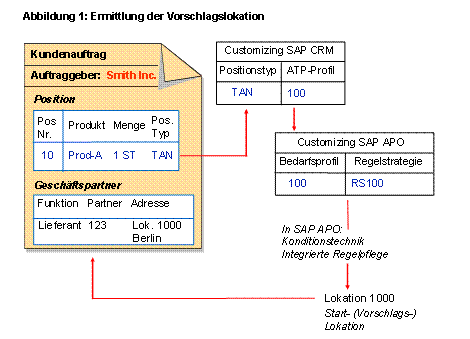
The location is determined for each confirmation schedule line in the sales order as follows:
...
1. The ATP system determines a default location based on the item category.
2. The item category has an ATP profile assigned to it.
3. For ATP check with SAP APO:
The ATP profile in CRM Enterprise is mapped to the requirements profile in SAP APO.
For ATP check with SAP ECC:
The ATP profile is used to specify that the item category is relevant for ATP check.
4. The requirements profile is used to control the ATP check, which includes determining the default location.
For more information, see the SAP Library for SAP Supply Chain Management under SAP Advanced Planning and Optimization ® Global Available-to-Promise (Global ATP) ® Advanced Availability check Methods ® Rules-Based Availability Check.
5. The location is automatically entered in the sales order as a business partner with the role Vendor.
For information on how to set this up, see the Implementation Guide (IMG) for Customer Relationship Management under Basic Functions ® Availability Check:
○ Availability Check Using SAP APO
○ Availability Check Using SAP ECC
If you make certain changes to a sales order item, such as the product, the quantity, or the item category, then availability check is carried out again in this location.
Example
The following figure shows how the location is determined when using SAP APO as the ATP system:
If rules-based ATP check is used, then the system can continue to find the product from other locations to fulfil the requested quantity.
For more information on rules-based ATP check in SAP APO, see the SAP Library for mySAP Supply Chain Management under SAP Advanced Planning and Optimization ® Global Available-to-Promise (Global ATP) ® Advanced Availability Check Methods ® Rules-Based Availability Check.
For more
information about rules-based ATP check in CRM Enterprise, see  Rules-Based
Availability Check in the SAP Library for mySAP Customer Relationship
Management.
Rules-Based
Availability Check in the SAP Library for mySAP Customer Relationship
Management.
Activities
To see the location for the header or an item in the sales order, choose the Partner tab.
You can change the location if there are no checked deliveries for the item or one of its subitems.
For more information, see Location – Entering Manually in the Sales Order.
...
See also:
For more information about
business partners
in SAP CRM, see SAP Library for Customer Relationship Management at Components and Functions ® Master
Data ® Business
Partners
Business partners
in SAP R/3 Enterprise, see SAP Library for SAP R/3 Enterprise at SAP R/3 Application Components ® Cross-Application Components ® SAP Business
Partner