 Time Deposits
An account feature in Account Management (FS-AM) for managing time deposit agreements.
All the other basic functions of the account are also available.
You use an account with an active time deposit feature (feature attribute 0015) for managing time deposits. This is a term-based product with a fixed term.
An account can only ever have one current time deposit agreement. The terms of time deposit agreements for an account are not allowed to overlap.
The following characteristics apply for all time deposit agreements of a time deposit account and the system displays these on the Time Deposit tab page.
Standard declaration of intent
The standard declaration of intent specifies how the system responds once the term end of a time deposit agreement has been reached. This response applies if you have not manually scheduled any additional, future time deposit agreement.
For more information, see the documentation for the field in the system.
Phase
The life cycle of a time deposit agreement (and thus the time deposit account) has three phases:
The preliminary phase starts with the contract start of the time deposit account and ends with the end of the first day of fixing.
The fixing phase starts with the term start and ends with the term end. During this phase, the agreed contract amount and the conditions are fixed and are not changed.
 Note
NoteYou can define a working day shift for the end-of-day processing. In background processing, the system calculates the original end of term, which it uses for condition diferentiation.
End of the note.For more information, see Fixing Time Deposits.
The calling phase starts with the term end of the time deposit agreement. During this phase, you can change data of the time deposit agreement such as the standard declaration of intent or the contract amount of a subsequent time deposit agreement.
For more information, see Calling Time Deposits.
The system displays the current phase in the account on the Time Deposit tab page in the Phase group box.
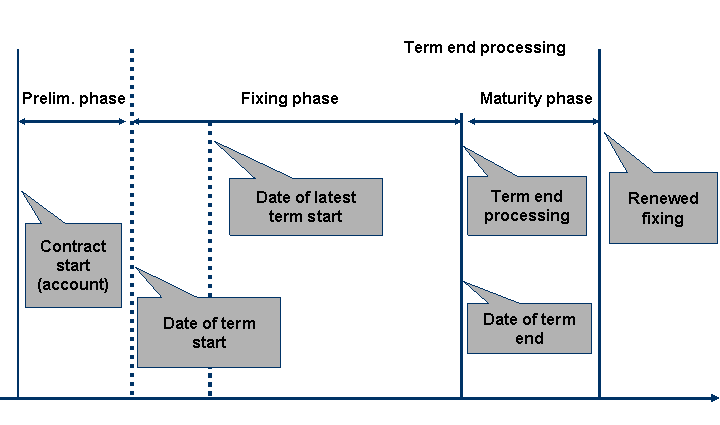
Phases of a time deposit account
The system automatically renews the time deposit agreement if you set up the standard declaration of intent and the actions at the term end accordingly.
You can define a period of grace for the transition into a subsequent agreement (by renewal or manual scheduling).

Period of grace for time deposits
For information about the agreements when you create a time deposit agreement, see Editing Time Deposits.
Structure
Time deposits have master data and flow data:
Master data
The Time Deposit (BCFD) contract element manages the master data of the time deposit.
Flow data
The life cycle control of the time deposit monitors and controls the flow data of the time deposit.
For more information, call transaction FS_AM_TECH_DOC (Technical Documentation FS-AM)
and see the Time Deposit section and its assigned sections under Account Management Objects:
Contract Element: Time Deposit (BCFD)
Life Cycle Control of Time Deposits
Time Deposit Events
The structure definition of time deposits is divided into attributes, methods, and customer enhancements.
Attributes
Time deposit (contract data)
Early Withdrawal for Time Deposits
Phase
Product prerequisites (term variant, contract amount, increase, reduction, scheduling dates, term dates, correspondence)
Time deposit agreement (time deposit agreement number, term, status, contract amount, characteristics, interest rate lock period)
Methods
In Account Management (FS-AM)
, you can use one of the following channels for processing objects:
Dialog
Business Application Programming Interface (BAPI)
Direct Input (DI)
The following overview shows which time deposit methods can be called and the channel that can be used:
Dialog
Individual processing:
Transaction code | Short description |
|---|---|
Transaction | |
Transaction | |
Transaction | |
Transaction | |
Transaction | |
Transaction |
Mass processes:
Transaction Code | Short Description |
|---|---|
Transaction | |
Transaction | |
Transaction | |
Transaction | Execute due early withdrawal |
Transaction | Application log - execute due early withdrawal |
Business Application Programming Interface (BAPI)
Time deposits do not have a separate BOR object like, for example, the product change (account). This is because the master data of the time deposit is part of the master data for the account. The master data of the time deposit can be edited with the following BAPIs:
CMAccountAM.FixedTermDepositGetDetail
CMAccountAM.FixedTermDepositChange
There are no BAPIs for the flow data of the time deposit (such as for fixing time deposits).
Direct Input
Direct input is implemented for the data of the time deposit contract element (BCFD).
Customer Enhancements
The following business transaction events (BTEs) are available for time deposits:
Publish & Subscribe BTEs
BTE | Short Description |
|---|---|
0BCA2701 | Time deposit (OPEN SINGLE) |
0BCA2702 | Fix time deposit (SET SINGLE) |
0BCA2703 | Specify actions at term start (SET SINGLE) |
0BCA2704 | Actions after seamless renewal (SET SINGLE) |
0BCA2705 | Create notice of maturity (SET SINGLE) |
0BCA2706 | Call time deposit (SET SINGLE) |
0BCA2707 | Reset fixing (SET SINGLE) |
0BCA2708 | Reset calling (SET SINGLE) |
0BCA2709 | Time deposit (CHECK SINGLE) |
0BCA2710 | Time deposit (PREPARE ALL) |
0BCA2711 | Time deposit (SAVE ALL) |
0BCA2712 | Time deposit (RESET ALL) |
Process BTEs
BTE | Short Description |
|---|---|
0BCAA110 | Print correspondence type BA11 |
0BCAA111 | Request for correspondence type BA11 |
0BCAA120 | Print correspondence type BA12 |
0BCAA121 | Request for correspondence type BA12 |
0BCAA130 | Print correspondence type BA13 |
0BCAA131 | Request for correspondence type BA13 |
0BCAA140 | Print correspondence type BA14 |
0BCAA141 | Request for correspondence type BA14 |
Integration
You make the settings for life cycle control in Customizing for Account Management (FS-AM)
, under 
Product Management

Life Cycle Control of Time Deposits
 in the following Customizing activities:
Edit Start of Term Variants
Edit Term Variants
Check Term Variants
Processor Determination for Time Deposit
You make product settings in Customizing for Account Management (FS-AM)
, under Product Management
Product Definition
Account Products
Create or Change Account Product
Next Screen
Used Attributes
Time Deposit.