 Product Change (Card Pool)
Definition
An
Account Management (FS-AM)
business object that represents the exchange of the
product
a
card pool
is based on (source product) with a target product. The target product can be a new version of the source product or a completely different product. The system always chooses the valid version of the target product.
A product change (card pool) can be necessary if the customer or the bank requires considerable contract changes at a particular time in the present or future. You can carry out a product change for an individual card pool or for any number of selected card pools in a mass run. A product change can also be linked to a particular event for the participant cards (such as exchange or renewal).
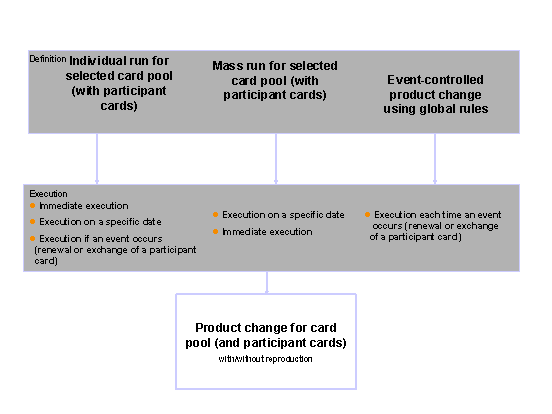
In
Account Management (FS-AM)
, a product change is managed as an
orderby
Order Management (FS-AM-OM)
. A product change always has two steps:
To schedule the card pool for a product change, create and activate an order for product change.
To carry out the actual product change, execute the order.
You can carry out a product change either for an individual card pool, for selected card pools in a mass run, or linked to a particular event.
For each attribute group, you can define whether the field values of the source card pool or the attributes of the target product have priority in a product change.
Use
The product change (card pool) is done either manually in dialogmode or automatically using a Business Application Programming Interface (BAPI).
The product change (card pool) function can use the business transaction category (Entry Origin or Processing Origin field) to identify the channel used to process it.
Entry OriginProcessing Origin |
Short Description |
Channel |
|---|---|---|
BOCCPP |
Product change (card pool) - dialog |
Dialog |
CCPPCP |
Mass product change (card pool) – mass processing |
Dialog |
COCPCA |
Due product change (card pool) – mass processing |
Dialog |
BAPCCPP |
Product change (card pool) - BAPI |
BAPI |
BDCCPP |
Product change (card pool) – BAPI (EDT) |
BAPI |
When you create or change a product change (card pool) in dialog mode, the system enters the Entry Origin and Processing Origin fields. You can use a BAPI to specify an entry origin or processing origin.
The order status of a product change (card pool) can change during processing. See the Order Status of Product Change section.
Dialog
You can call up the following transactions in dialog mode:
Transaction Code |
Short Description |
|---|---|
BCA_OR_CCPP |
|
BCA_CCPP_CARD |
|
BCA_CP_CCPP_PP_ALL |
Application log – selected product changes (card pool) |
BCA_CCPP_VERS_CP |
|
BCA_CCPP_VERS_PP_ALL |
Application log – optimized product version change (card pool) |
BCA_CCPP_TEV |
|
BCA_OR_CCPP_PP_ALL |
Application log – due product change (card pool) |
Business Application Programming Interface
You can call up the following methods using the BAPI Explorer :
Method* |
Short Description |
|---|---|
ProductChgCardPool.CreateAndActivate |
Create and activate product change (card pool) |
ProductChgCardPool.ChangeAndActivate |
Change and activate product change (card pool) |
ProductChgCardPool.ChangeAndDeactivate |
Change and deactivate product change (card pool) |
ProductChgCardPool.GetDetail |
Read product change (card pool) |
ProductChgCardPool.GetOrdersByCard |
Read order numbers of product change (card pool) |
You can also execute all methods as a test run.
Direct Input
Direct Input is not implemented for a product change (card pool). You can make external data transfers (EDT) using the BAPIs that have entry origin or processing origin BDCCPP.
Customer Enhancements
You can find the Business Add-Ins (BAdIs) available for a product change (card pool) in Customizing for
Account Management (FS-AM)
by choosing

Order Management

Product Change (Card Pool)
Business Add-Ins (BAdIs)
 .
.
Structure
Attributes
Attributesof order management
Target product
Total transfer procedure
Planned product change date
Actual product change date
Correspondence for product change
Future contract changes
Immediate product change
Reference attributes
Reference attributes refer to other
Account Management
(FS-AM)
objects, whose documentation is referred to below in the “Integration” section.
Integration
You make the settings for product change (card pool) in Customizing for
Account Management (FS-AM)
under the following structure nodes and in the following IMG activities:
-
Basic Settings
Maintain Origin Data
-
Order Management
Basic Settings
Configure Order Category
-
Order Management
Product Change (Card Pool)
When you are processing product changes (card pool), the corresponding
release objectand the various authorization objects control the program flow. For more information, see
Authorization Administration in Account Management
.The system calls up and processes the following objects from
Account Management (FS-AM)
when processing the product change (card pool).
Checks
The system checks the following settings and attributes:
Is the product transition from the card pool source product to the target product permitted according to the Customizing settings for product change? If this is not the case, the system displays an error message.
Does the product version of the target product have status
Active
on the planned product change date when you activate the product change? If this is not the case, the system displays an error message.Does the product version of the target product have the status
Active
on the actual product change date when you execute the product change? If this is not the case, the system displays an error message.
Objects Generated by the System
-
The system generates a change document that meets auditing requirements.
-
The system generates a correspondence request.
Flag for mass processing
When activating a product change (card pool) for which the
Immediate Product Change
indicator is not set, the system generates a flag for mass processing.Work item
The system generates a work item for the release process, if required on the basis of the Customizing settings.