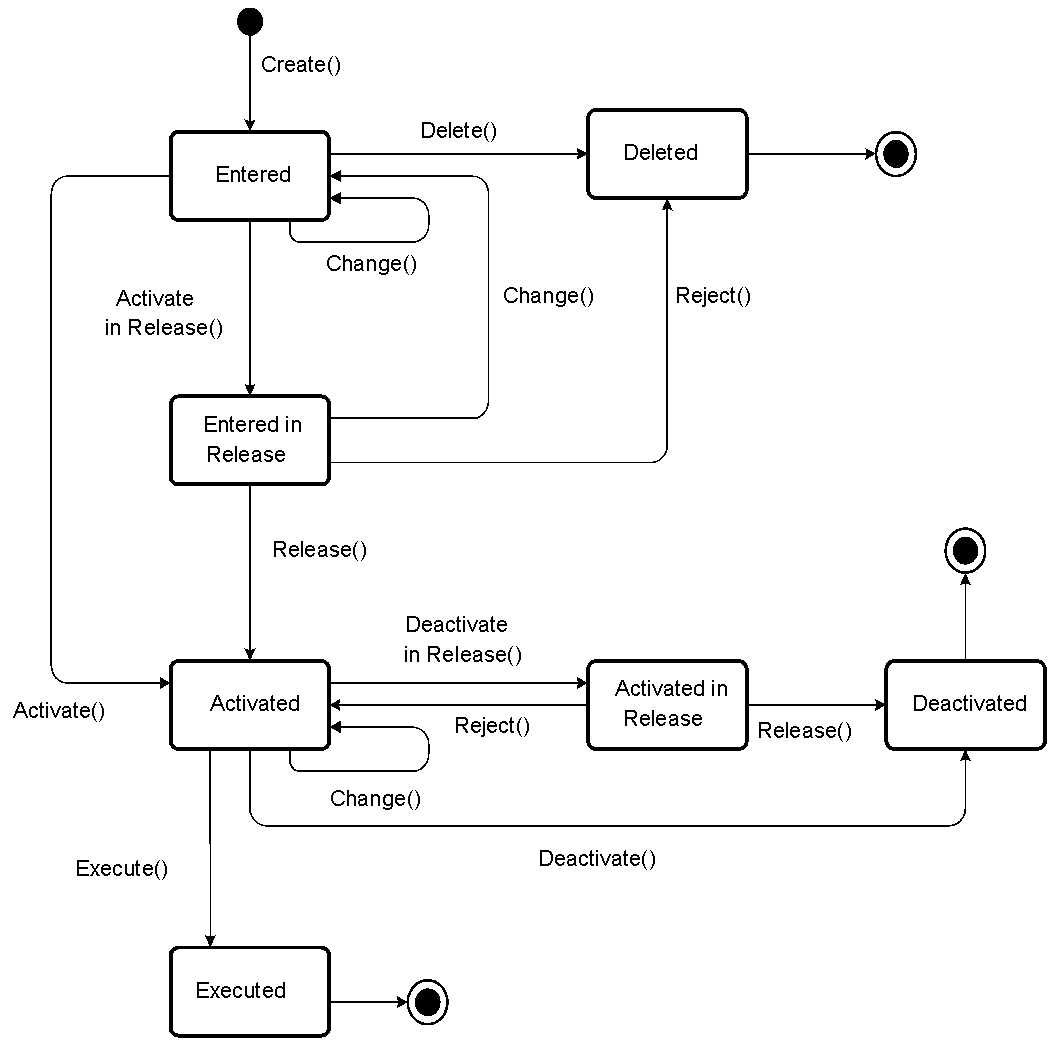
Order Status of a Product Change (Account), (Card), (Card Pool)
You can process a product change using its methods (see the Methods section of Product Change (Account), Product Change (Card) or Product Change (Card Pool)). If processing is successful, the order status of the product change
can change. The following combinations of order status
, release status
, and operation to be released
describe the status of a product change while it is being processed.
Order Status | Release Status | Operation to Be Released |
Entered | Not In Release | - |
Entered | In Release | Activate |
Deleted | Not In Release | - |
Activated | Not In Release | - |
Activated | In Release | Activate |
Activated | In Release | Deactivate |
Deactivated | Not In Release | - |
Executed | Not In Release | - |
 Note
Note
You can see which operation can always be selected as a release attribute on the basis of the Operation Relevant for Release
indicator in Customizing for Account Management (FS-AM)
under 
Order Management

Basic Settings
Configure Order Category
 . If the
 Operation Relevant for Release
indicator is set, you can define release reasons that comprise the flagged operations as release attributes and that cause product changes to be forwarded to the release process. You do this in the Account Management (FS-AM)
Customizing settings by choosing Order Management
Product Change (Account) or Product Change (Card) or Product Change (Card Pool)
Release
Assign Release Procedure to Release Object
Status Changes of a Product Change