 Monitoring Dormant Accounts
Purpose
You can use this process to identify accounts by the activity statusand to identify accounts that are no longer used.
An account can have various activity statuses during its lifecycle, such as
active
,
dormant
or
abandoned
. The current status depends always upon the actions of the account holder within a period of time (Create
customer contactand initiate
payment items). Moving house or becoming deceased can be reasons for the abandonment of an account.
If there is no customer activity, the system automatically sets the activity status based on defined status transition rules. You can generate a notification to the account holder with
SAP Correspondence.
When the
account is settled
, the activity status can be included in the charge calculation.
The
escheat
process follows the process
Monitoring Dormant Accounts.
You can also use the process
Monitoring Dormant Accounts
independently.
Prerequisites
Technical Prerequisites
You are using
SAP Business Intelligence (SAP BI)
.You are using SAP Business Partner for Financial Services (GP-FS) or a comparable application for managing the business partner data. This application provides the date of the last customer contact (BP_LAST_CUST_CONTACT) and the address data on the Status tab page in the
Last Customer Contact
group box.To generate correspondence, you need to use SAP Correspondence (FS-TO-COR) or a comparable system.
The date of the last customer contact is current, meaning that it meets the following condition: The date of the last customer contact is on or after the time of the last payment item that was triggered by the customer. The system updates the date automatically. You can also update the date manually in the dialog in
SAP Business Partner for Financial Services (BP-FS).
Customizing
You have activated the attributes
Activity Status
andProperty Codes
in the Customizing forAccount Management (FS-AM).
For more information, see the Implementation Guide (IMG) for
Account Management (FS-AM)
under
Product Management

Product Definition
Account Products
Change Account Product
 .
.
In the Customizing for
Account Management (FS-AM)
you have carried out the following activities under Contract Management
Account
Activity Status Conversion.
Define Activity Status
To connect the
Escheat
process, you need to set the indicatorRelevant for Escheat
for an activity status.To use the automatic reactivation, you need to set the indicator
Reactivate Account
for an activity status.Define Property Codes
Define Status Transition Rules
To notify the account holders, you need to set the indicator
Initiate Correspondence
for one or more status transition rules, and process all the relevant IMG activities in the Customizing forAccount Management (FS-AM)
under Tools
Correspondence Tooland
Print Workbench
.
If the system is to include the activity status when it posts all the charges that are relevant for settlement, you need to process the following IMG activities in the Customizing for
Account Management (FS-AM)
underProduct Management
Financial Conditions
:Maintain Differentiation Categories
You have created a differentiation category for the activity status with the differentiation value category
Reference to Table
. The table TBCA_CN_ACT_ST contains the characteristic values of the activity statuses you defined with the following values:1. Field name ACTIVITY_STATUS
Text table TBCA_CN_ACT_ST_T
Language field SPRAS
Text field ACT_ST_SHORTTEXT
Assign Differentiation Categories to Condition Categories
You have assigned the differentiation category
Activity Status
with the condition category105010 Settlement Charges.
For more information, see the documentation for Financial Conditions .
Process Flow
The process flow is as follows:
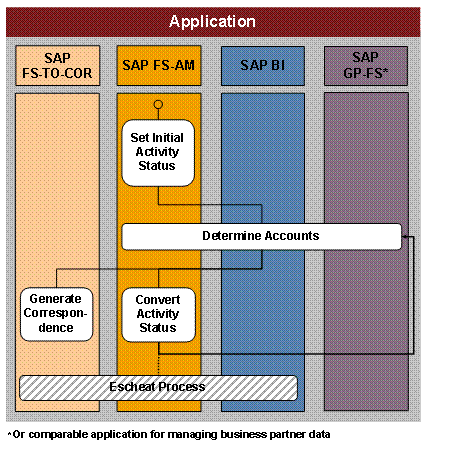
Process flow for the process
Monitoring Dormant Accounts
in the applications involved:
Set initial activity status (SAP FS-AM)
When an account is created in
Account Management (FS-AM)
, it first receives the initial activity status that is active in the standard system.Determine accounts (SAP BI, SAP FS-AM and SAP BP-FS)
BI
uses the status transition rules defined in Customizing to find all accounts inAM
where the date of the last customer contact or the time of the last payment item that was triggered by the customer is older than a certain period of time.Generate correspondence (SAP FS-TOR-COR)
Using SAP Correspondence you can generate a notification to the account holder, either at the time of the activity status conversion or before, depending on the Customizing settings
.
Convert activity status (SAP FS-AM)
A periodic mass run in
AM
(reportActivity Status Conversion for Contracts
) converts the activity status for all affected accounts.If you use automatic reactivation, it is possible to convert back to the initial activity status once the customer has made contact, or triggered a payment item (depending on the reference date selected in Customizing).
The process starts again at step 2
Determine Accounts.
Result
The account is in an activity status that represents the current customer activity. The account holder can be informed about the activity status of the account.
If an account is converted to an activity status that is flagged in Customizing as relevant for an escheat, the
Escheat
process starts. In this process you can transfer the balances of dormant accounts to a clearing account.
See also:
IMG for
Account Management (FS-AM)
underTechnical Documentation for Account Management (FS-AM)
in section Account Management Objects
Contract
Contract Elements
Activity Status (BCDM)
Documentation for report
Activity Status Conversion for Contracts
(RBCA_DORM_RUN_PP) on theSAP Easy Access
screen under Account Management
Periodic Tasks
Restart Activity Status Conversion
.