
 Process
Instance
Process
Instance

Definition
Running process. The process instance (runtime object) is generated by starting a process, that is by initiating a process template (design time object). The process instance is a complete process including all actions, blocks and phases, which must be processed by all process contributors in the form of tasks.
Use
After the process starts, the system displays the tasks assigned to you in the UI of the process instance. Using the available navigation elements, you can retrieve all required detail information to carry out your tasks.
Structure
The screen is divided into the following areas when you work with process instances:
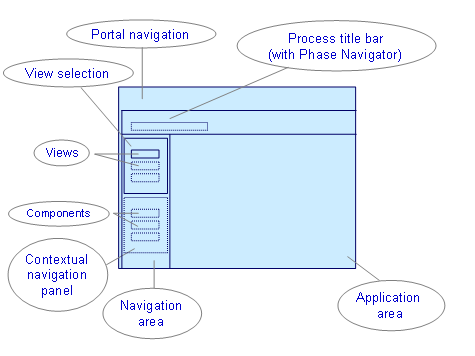
Portal Navigation
The main navigation (above) and the step navigation (left) of the portal are parts of this screen area. Guided Procedures is embedded in the portal. The step navigation under Guided Procedures is always empty and minimized.
Process Title Bar
This screen area is part of the runtime basic layout. For more information about the basic layout, refer to Core Elements of the Runtime. The screen displays the respective title of the current open process.
Phase Navigator
The Phase Navigator is displayed in the process title bar. It shows the individual phases of a process. The navigator is only visible for multiple phase processes. For more information about the Phase Navigator, see Core Elements of the Runtime.
Application Area
This screen area is part of the runtime basic layout. For more information about the basic layout, refer to Core Elements of the Runtime. The application area is your actual work center in the runtime. All available process information and processing steps are displayed in the application area.
Navigation Area
This screen area is part of the runtime basic layout. For more information about the basic layout, refer to Core Elements of the Runtime. The navigation area contains additional screen areas (see also below):
· Screen area View Selection
¡ Views
· Screen area Contextual Navigation Panel
¡ Components
Contextual Navigation Panel
This screen area is not necessarily available for a specific process instance. You can only see this area if the necessary components were assigned to the process in the design time.
Components
In the design time, you can set the following components for a process instance.
· Activities (Activity Navigator)
· Process Control (Elements of Process Control)
· Phases (Mini Phase Navigator)
· You Can (You Can Navigator)
The You Can Navigator includes the elements You Can (process activities you can execute) and Information (Info Callable Objects and Ad-hoc Items assigned to the activity).
The components, if any, which are displayed in the contextual navigation panel depend on the views (see View Selection screen area) which you set for the process instance in the design time when you create the process template. For more information about the various components and their use, see Components of the Contextual Navigation Panel.
View Selection
At least one view is assigned to this screen area in the design time. View selection allows all process contributors to oversee different aspects of the running process, depending on the view selected.
Views
In the design time, you can set the following generic views for a process instance; additionally, each view has assigned its own components for the contextual navigation panel.
· Process Activities (in various versions)
· Overview
· Process Information
· Additional Resources
You can also create your own individual views in the design time. For more information about generic views, see GP Generic Views. For more information about how to create your own views, see Defining Runtime Views.