
 Personal Templates

Definition
By means of this workset the GP User designs simple processes. It is part of the simplified GP User design time accessible for the GP User portal role (along with the GP runtime). The system stores all development objects of the action and process template types in this workset.
Use
You can use the following functions in this workset:
· Create Process

§ When creating a process, you always create an action as well. Both wizards include the step Defining Activities that is identical to the Create Action function.
§ The Create Process function of the Personal Templates workset is identical to the Design and Start a Simple Process function of the Runtime environment.
· Create Action
You can use this function to create individual actions including a Callable Object.
● As in the gallery of the regular design time, you can create your own folders here. You are the only user with access to this area.
● By choosing Publish you can make your objects generally available in the Public Folder area of the regular design time.
Structure
The following figure illustrates the tools that are available in this workset:
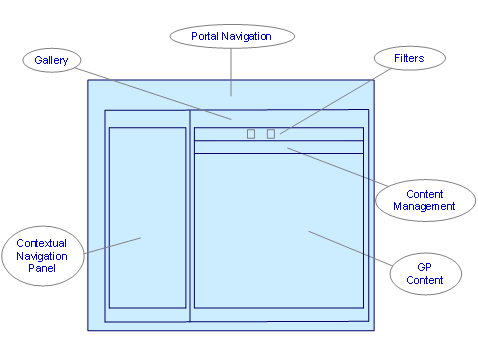
· Contextual Navigation Panel
Using the links available in the contextual navigation panel, you can create the objects that are stored in the Personal Templates workset.
· Filters and Content Management
Using the available filters, you can choose to display only the selected types of objects that are stored in the Personal Templates – actions or processes. In addition, you can create and edit folders, delete and publish objects.
· GP Content
The content of the Personal Templates is displayed in the central frame. Here you can browse the available folders and manage them or their content.
Activities
To access this workset, choose Personal Templates in the top portal navigation area.
See also: