
 GP Work Center

Definition
The GP work center is the central point of entry to all available process instances and their associated tasks and provides a comprehensive overview.
Use
There are two ways how you can start new processes:
· Starting (Initiating) a New Process
You can initiate a process template created in the design time for execution in the runtime. This means you make the process template available as an executable process instance.
· Creating and Starting a Simple Process
If you have the GP User portal role assigned (see also Portal Roles), you can use two wizards for creating and starting your own simple processes.
You can choose from the following four overviews:
· Overview
Overview of all activity and display options within the runtime.
Overview of all overdue tasks as well as all erroneous processes of which you are the owner.
Overview of all processes to which you contribute depending on your process roles.
· Tasks
Overview of all pending and completed tasks.
Structure
The screen of the GP work center is divided into the following areas:
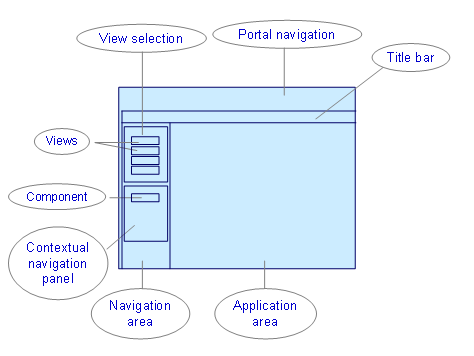
Portal Navigation
The main navigation (above) and the step navigation (left) of the portal are parts of this screen area. Guided Procedures is embedded in the portal. The step navigation under Guided Procedures is always empty and minimized.
Title Bar
This screen area is part of the runtime basic layout. For more information about the basic layout, refer to Core Elements of the Runtime. The title bar shows the title Guided Procedures Runtime Work Center (GP work center).
Application Area
This screen area is part of the runtime basic layout. For more information about the basic layout, refer to Core Elements of the Runtime.
Navigation Area
This screen area is part of the runtime basic layout. For more information about the basic layout, refer to Core Elements of the Runtime. The navigation area contains additional screen areas (see also below):
· Screen area View Selection
¡ Views
· Screen area Contextual Navigation Panel
¡ Component
Contextual Navigation Panel
This screen area contains exactly one component in the GP work center. For more information about specific components and their use, see Components of the Contextual Navigation Panel.
Component
Only the component You Can (You Can Navigator) is available in the GP work center. It contains the following navigation elements:
· Creating and Starting a Simple Process
View Selection
This screen area provides four views in the GP work center. For more information about specific views, refer to GP Generic Views.
Views
The following views are available in the GP work center:
· Overview
· Tasks