
 Every User Roles
Use
The every user roles shipped with the portal typically provide the non-administrative portal content to all portal users; for example, the portal personalization settings, collaborative tools (such as rooms, instant messaging, and application sharing), and daily task-related iViews (such as calendar and e-mail).
The portal supplies the following out-of-the-box every user roles:
· Standard User role
· Every User Core role
· Control Center User role
This topic describes these roles and provides information about which role you should use for your particular work environment.
Integration
The following figure illustrates the every user roles shipped with the portal. Each role consists of a source object in the reserved Content Provided by SAP folder and a delta link object in the Portal Content folder.
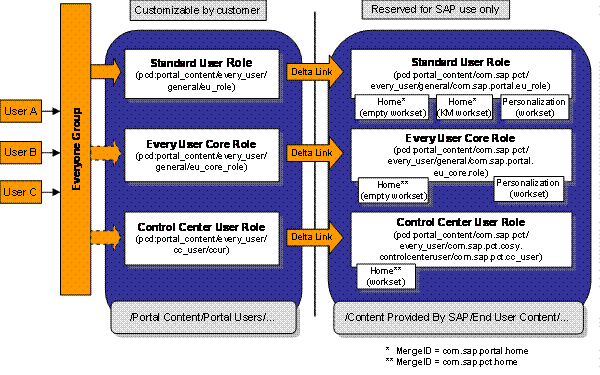
To modify the out-of-the-box roles, edit the delta link objects in the Portal Content/Portal User/ sub-folders only.
Features
The Standard User role is similar to the combined contents of the Control Center User role and the Every User Core role:
· The Standard User role contains basic portal functionality (such as portal personalization iViews), but also physical KMC (Knowledge Management and Collaboration) content objects.
· The Every User Core role is a reduced version of the Standard User role. It provides only the basic functionality of the portal (portal personalization iViews)—meaning it is more flexible than the Standard User role—and is intended to co-exist with other user roles that provide the business-related content.
The Every User Core role also contains an empty Home workset, which serves as a placeholder for smart merging any external role with physical content assigned to an identical Home workset—for example, the Control Center User role.
For general information about smart merging of navigation entries, see Merging Navigation Nodes and Defining the Sequence.
For detailed information about the content structure of each role and their location, see:
· Role: Every User Core (eu_core_role)
Activities
Guidelines and Recommendations for Using the Every User Roles
Each every user role is tailored to suit a specific scenario or installation. Use the following guidelines and recommendations to determine which role to implement in your environment:
· The Control Center User role is recommended for all new NetWeaver customers who intend to use the pre-configured business user content offering of SAP, especially customers planning on integrating ERP.
· The Control Center User role does not contain the portal personalization iViews; therefore, it should be used in conjunction with Every User Core role.
· The Every User Core role should be used by all new NetWeaver customers, especially the following:
¡ CRM 4.0 and CRM BPP customers using the CRM User role, but not using the Control Center User role or the Standard User role.
¡ NetWeaver customers using the Control Center User role, and not intending to use the Standard User Role.
¡ NetWeaver customers not intending to use at all the pre-configured business content offering of SAP (Standard User role and Control Center User).
¡ KMC customers.

All KMC iViews featured in the Standard User role are also included in the Control Center User role. Therefore, new KMC customers are recommended to use the Every User Core role with the Control Center User role.
· The Standard User role should continue to be used by existing NetWeaver customers who do not intend to use the Control Center User role.
Existing KMC customers should not install the Control Center User role; using the Standard User role with the Control Center User role generates redundant iViews.
Assigning Users to the Every User Roles
Once you have decided which every user roles you need to use, you need to assign your portal users to them.
By default, the Everyone group is assigned to the Standard User role. If you choose to use the other every user roles instead, you need to remove these assignments from the Standard User role and apply them to the Every User Core and Control Center User roles.