Autocompleting Relations
When a Drag&Relate operation is performed between two business objects having no direct relation, the autocomplete service, which is a sub-service of the relation resolving service, finds the relationship on the fly. The autocomplete service checks available business objects, and the relations between them, in order to complete a chain of links forming a relation between any two given objects.
For example, a link is dragged during runtime from an iView based on business object A onto an iView based on business object B. A relation may be found between object A and object B by going through other business objects, A to C to D to B. If more than one path is found to complete a relation, for example, A to E to F to G to B, the autocomplete service chooses the lightest one to compute, and to present, in this case, the first example. (See Single Relation Editor for an explanation of relation weights.)
Automatic relations are created on-the-fly and are kept in memory and cached until the cache is refreshed.

The shortest, or lightest path relating two business objects is not always the most suitable for your purposes. You may desire that a particular object be present to serve as an additional filter on a query launched to the back-end system. Such automatic relations can be fixed by making them manual in the Relationship Editor.
The Autocomplete Algorithm
The automatic completion of relations links two tables via one or more previously defined relations, using the transitive rule. This rule states that if A is related to B, and B is related to C, then A is related to C through B. In such a case, the automatic relationship between A and C is created using the pre-existing relations between A and B, and B and C
Working without Autocomplete
By default, the autocompletion of relations between objects is always enabled for the user during runtime. It is, however, possible to disable the service. For details, see Autocomplete Service Configuration.
Keep in mind that working without autocompletion of relations limits Drag&Relate capabilities.
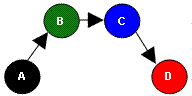
For example, consider an application containing four objects (A, B, C, and D), each having a direct relation to the next, as in the following illustration. Without autocomplete, there are three relationships: A to B, B to C, and between C to D. However, by autocompleting, the following additional relationships become available: A to C, A to D, and B to D.