
 User Management Engine in a Multitenant
Portal
User Management Engine in a Multitenant
Portal 
The user management capabilities in a multitenant portal are provided by the User Management Engine (UME), just as they are in a standard portal. UME managesthe data sources for user and group data, and provides administration tools to perform routine administration tasks.
Integration
Data Persistence
In a multitenant portal environment, UME obtains user data for each tenant from a separate client in an ABAP system—clients separated per tenant ensure clear separation of user data. For example, the figure below illustrates how TenantA receives its user data from client 100 in system HR2, while TenantB receives its user data from client 200 in system HR1.
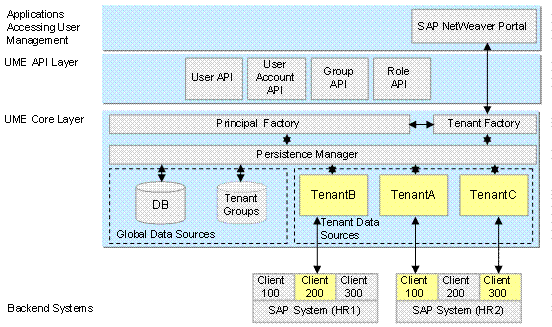
UME architecture supporting multitenancy in the portal
Data that is not tenant-specific is stored in the portal database; this includes global groups, global users (such as the standard Administrator and Guest users), global UME roles, and role assignments. User personalization data is also stored in the database of the J2EE engine. The following components are additions to the standard UME architecture (see previous figure), enabling it to support multitenancy in the portal:
· Tenant Factory: Enhances the UME Persistence Manager so it can manage and support multiple tenant data sources.
· Tenant Groups: A virtual group, containing all the tenant's users, is created for every tenant. For more information, see Users, Groups, and Roles and Initial Folders, Content, and Permissions for Tenants.
· Tenant Data Sources: Contains the data source of each tenant. Each data source references the ABAP system where the tenant's users are stored.
Configuration of Persistence
In a standard portal, the data sources used by UME are defined in an XML data source configuration file. However, in a multitenant portal, the data sources for each tenant are defined in the portal tenant system object that an administrator must create for each tenant. For more information, see Creating a Portal Tenant System).
Logon ID
Each tenant has its own unique URL for accessing the multitenant portal. The portal automatically prefixes the tenant name to the user ID when a user logs on to a specific tenant; this creates a unique user ID, which allows multiple users with the same user name to run on the same multitenant portal, as long as they belong to different tenants.
In the following figure, a user logs on to TenantA in the portal with user ID smith. The logon component automatically prefixes the tenant name to the user ID (TenantA\smith). UME finds the corresponding adapter for the tenant (the tenant name is converted to uppercase) and verifies if the user exists in the data source.
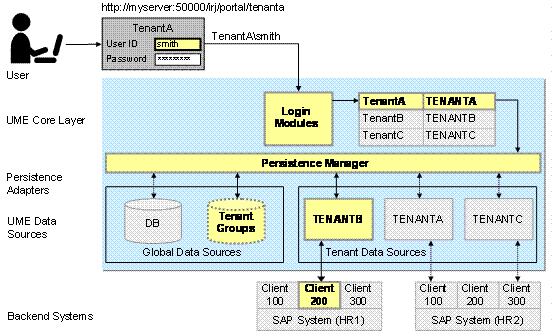
Logon and authorization in a multitenant portal
Features
User Administration
User administrators in a multitenant portal are either global or tenant-specific.
· Global user administrators can create and modify users, groups, and roles of any tenant in the portal.
· Tenant user administrators can create and modify users, groups, and roles belonging to their tenant only.
The portal automatically creates a user administration role for each tenant when the tenant is created. You can choose to use it or create your own. For more information, see Initial Folders, Content, and Permissions for Tenants.
For more information on managing users, groups, and roles, see Managing Users, Groups, and Roles.
Single Sign-On
The multitenant portal issues logon tickets to users. Based on the client entered in the logon ticket, backend systems can determine which tenant a user belongs to. For more details, see Single Sign-On With Logon Tickets.