Churn Analysis
Purpose
The
analytical application Churn Management allows you
to analyze, understand, predict, and influence the churn behavior of your
customers. In doing so, you can reduce customer churn and increase customer
retention in the long term. A range of data mining methods (see
 Data Mining) and additional
analytical applications enable you to spot patterns in the behavior of former
customers who have left your company. This involves determining different key
figures about the value of a customer and about that customer's propensity to
churn, such as Likelihood to Churn, Customer Value Index, and the Value-Churn Index. In Churn
Management, customer satisfaction and loyalty are also included in the
analysis. On the basis of this information, you can take appropriate measures
to retain any active customers whose behavior reflects similar patterns to
"churned" (that is, lost) customers and who are dissatisfied yet valuable to
your company.
Data Mining) and additional
analytical applications enable you to spot patterns in the behavior of former
customers who have left your company. This involves determining different key
figures about the value of a customer and about that customer's propensity to
churn, such as Likelihood to Churn, Customer Value Index, and the Value-Churn Index. In Churn
Management, customer satisfaction and loyalty are also included in the
analysis. On the basis of this information, you can take appropriate measures
to retain any active customers whose behavior reflects similar patterns to
"churned" (that is, lost) customers and who are dissatisfied yet valuable to
your company.
You can use the delivered Web templates to display the results of Churn Management in the Web browser or in your portal (see Web Template: Overview of Churn Management).
The
MultiProvider CRM Churn Management COPA (0CUST_MC1) forms the basis for
Churn Management, constantly combining and updating the data during the
process. Various queries are built on this basis and provide input data for
the steps below. For information about the entire Business Content for the
analytical application Churn Management, see
Customer
Analyses.
Prerequisites
Historic and current customer data (master data such as demographic data and transaction data such as sales order data) needs to be available in SAP BW.
You need to be assigned in SAP BW to one of the following roles:
·
Churn Management (SAP_BWC_CUSTOMER_CHURN) or Customer Behavior Analysis (
SAP_BWC_CUSTOMER_BEHAVIOR)
In order to be able to use the Web templates, you need the following additional roles for technical reasons:
· Churn Management - Profile (SAP_BWC_CUSTOMER_CHURN2)
· Churn Management - Source (SAP_BWC_CUSTOMER_CHURN_SOURCE)
Process Flow
The following steps need to be taken in the specified order for all relevant data to be displayed on the Web.

To use Churn Management to the best advantage, you have to perform these steps - in particular the data mining predictions - on a regular basis. If, however, you perform the steps more than once in a given month, the data from the previous run is overwritten. The results saved in the master data are always overwritten, regardless of how often you perform the steps.
It is important to ensure that you perform all of the steps within the same calendar month since the steps build upon those performed previously.
Some of the steps contain information about how you can specify the month during which the data is posted.
...
1. Use Customer Lifetime Value Analysis to determine the number of active and lost customers and which customers fall into which category.
For this, copy the delivered CLTV model CLTV Based on Customer
Profitability (0CRM_COPA) and the delivered CLTV prediction Prediction for Churn Rate (0CRM_P_CHRN) and
execute your model and your prediction using the query Churn: CLTV Input (0CRM_CUST_Q0001). The
numbers of active and lost customers as well as the churn rate are written to
the ODS object CLTV Prediction (
0CRM_OLVF) and can be displayed
with the query Churn: CLTV Prediction: Active and Lost
Customers (0CRM_CUST_Q0007). The status of
each customer is written to the respective customer's master data if you have
set the indicator Update Customer Status (Active/Lost) to
the Attribute for the CLTV prediction. In the delivered CLTV
prediction, the attribute Customer Status (
0CRMACSTAT) is filled for
the Business Partner (
0BPARTNER).
2. Conduct a survey on Customer Satisfaction and Loyalty with your active customers.
The survey results are written to the ODS object Delta Extraction: Survey Results (0WS_O01). Transfer the results from there to the ODS object CRM Churn Management Data (0CUST_DS1). With this transfer, the satisfaction index and the loyalty index are determined. For this, you need to adapt the start routine for the update rules depending on the questions asked in the satisfaction and loyalty survey.
Change the following section of source text by entering between the inverted commas in each line the ID of one of your questions regarding customer loyalty. List in this way all questions that are to be used to calculate the loyalty index.
* adapt
this according to your question id for loyalty
s_data-WS_QUEST cs
'SAP_DEMO_LOY1' or
s_data-WS_QUEST cs
'SAP_DEMO_LOY2' or
s_data-WS_QUEST cs
'SAP_DEMO_LOY3'
You make the same settings for your questions on customer satisfaction in the following section of the source text:
* adapt
this according to your question id for satisfaction
s_data-WS_QUEST cs
'SAP_DEMO_SAT1'
In the update rules, you also specify the month in which the data was posted. To do this, open a routine and assign a constant to the characteristic Calendar Month / Year (0CALMONTH) in the Key Fields tab page.
3. Transfer the data from the ODS object CRM Churn Management Data (0CUST_DS1) into the InfoCube CRM Churn Management (0CUST_C1) so that the data can be used in subsequent analyses.
Ensure that, each time you update the InfoCube, you delete the data already in the InfoCube (indicator in the InfoPackage). If you fail to do so, the old and new data will be added together by mistake.
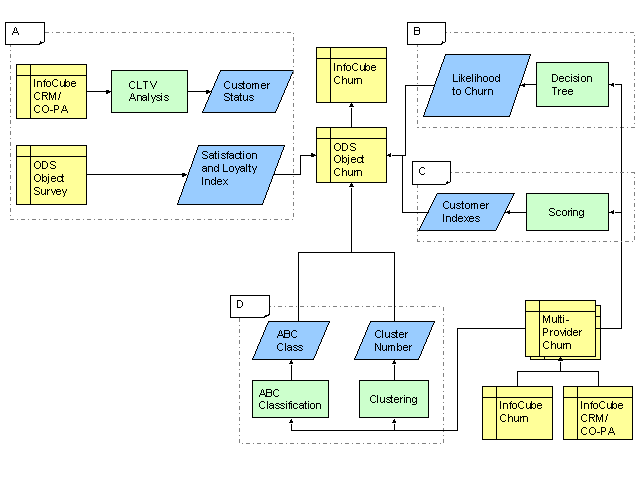
You have now completed the steps grouped together as block A in the overview graphic at the end of this document.
4.
Use the data mining method
Decision Trees to determine for
each customer the likelihood to churn and the predicted customer status. To
determine the predicted customer status, you take as your basis the customer
status determined in step 1 during CLTV analysis. The likelihood to churn is
calculated from the predicted customer status and confidence (0DM_CFDNC) of
the prediction.
Proceed as follows:
...
a. Create a new analysis to create data mining model for Churn Decision Tree based on the query Churn: Input for Decision Tree (0CRM_CUST_Q0002) using the Analysis Process Designer (APD). Execute this process to train the model. For more information on creating data mining models in APD, see the documentation under SAP NetWeaver ® SAP Business Warehouse ® BI Platform ® Data Mining.
b. Create an analysis process for prediction in the APD with the master data InfoObject as the target node to load the predicted customer status into the attribute Prediction Field (0DM_PRDCTD) for each respective business partner. For more information, see the documentation under SAP NetWeaver ® SAP Business Warehouse ® BI Platform ® Analysis Process Designer.
c. To upload the prediction results into an ODS object:
i. Create a transactional ODS object similar to ODS object CRM Churn Management Data (0CUST_DS1) using Data Staging.
ii. Create an analysis process for prediction with this ODS object as the target node. Alternatively, copy the analysis process created in Step b and replace the existing target node with an ODS target node. Copying would enable to reuse any intermediate results created while executing the copied process.
iii. Add a routine node to calculate the Likelihood to Churn and attach it just before target node.
iv. Execute the prediction process.
v. From this transactional ODS object, use the standard BW staging procedures to write to the ODS object 0CUST_DS1.
5. Transfer the data from the ODS object CRM Churn Management Data (1) into the InfoCube CRM Churn Management (0CUST_C1) so that the data can be used in subsequent analyses.
You have now completed the steps grouped together as block B in the overview graphic at the end of this document.
6.
Use the data mining method
Scoring to determine the customer
value index and the value-churn index for active customers. The system uses
two data mining models of the type Weighted Score
Tables to calculate these indexes from the contribution margins (CM) 1
and 3 as well as from the likelihood to churn.
Proceed as follows:
...
a. Create a transactional ODS object similar to ODS object CRM Churn Management Data (0CUST_DS1) using Data Staging.
b. Create a new analysis process to create a new data mining model for Weighted Score Tables based on the queries Churn: Input for Scoring: Customer Value Index (0CRM_CUST_Q0003) and Churn: Input for Scoring: Value-Churn Index (0CRM_CUST_Q0004). For more information on creating data mining models in APD, see the documentation under SAP NetWeaver ® SAP Business Warehouse ® BI Platform ® Data Mining.
c. Attach the transactional ODS as the target node for this analysis process. Execute the process to write the results to the corresponding fields of ODS object.
d. From this transactional ODS object, use the standard BW staging procedures to write to the ODS object 0CUST_DS1.
e. Transfer the data from the ODS object CRM Churn Management Data (0CUST_DS1) to the InfoCube CRM Churn Management (0CUST_C1) so that the data can be applied in training the second scoring model.
7. Transfer the data from the ODS object CRM Churn Management Data (0CUST_DS1) into the InfoCube CRM Churn Management (0CUST_C1) so that the data can be used in subsequent analyses.
You have now completed the steps grouped together as block C in the overview graphic at the end of this document.
8.
Use the data mining method
Clustering to divide the customers
into segments on the basis of the data collected so far. This assists you in
ascertaining what type of customer behavior can be linked with which customer
value index and with which likelihood to churn. You can then perform a
marketing campaign for specific segments.
The procedure to perform Churn Analysis using a Clustering model is the same as described in Step 4. Load the cluster assignments thus derived into the attribute Cluster Number (0DM_CLUSNO) for the InfoObject Business Partner (0BPARTNER). In addition, load the results using the transactional ODS into the ODS object CRM Churn Management Data (0CUST_DS1). In this way, data is recorded showing how the cluster numbers have developed over time.
9.
Use the method
ABC Classification to classify your
active customers according to their customer value index.
Load the ABC class thus derived into the attribute
ABC Class (
0ABC_CLASS) for the InfoObject
Business Partner (0BPARTNER). In addition, load
the data from the transactional ODS into the ODS object CRM Churn Management Data (0CUST_DS1). In this way, data is
recorded showing how the ABC class has developed over time.
10. Transfer the data from the ODS object CRM Churn Management Data (0CUST_DS1) into the InfoCube CRM Churn Management (0CUST_C1).
You have now completed the steps grouped together as block D in the overview graphic at the end of this document.
11. Adapt the delivered Web templates to publish in your portal the results obtained.
The following graphic provides a simplified overview of the flow of data in churn management:
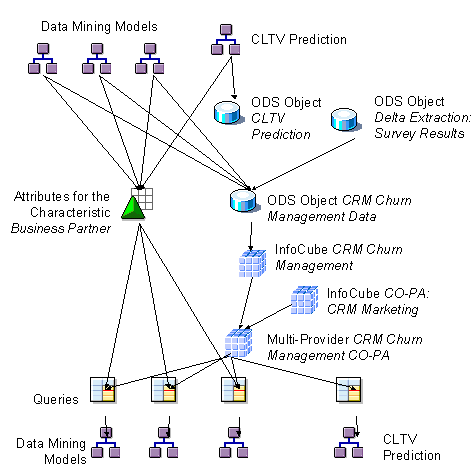
This data flow is performed four times (see blocks A to D in the following graphic). Upon completion of each block, the data is written from the ODS object into the InfoCube.