3.6 Using NWBC with a Load Balancer 
If a load balancer is available within the network, then it can be used directly with NWBC. Instead of configuring a direct URL on a specific application server, change the URL that NWBC is configured to use, to be directly that of the load balancer. On startup, NWBC will trigger a first HTTP request to the load balancer that will then redirect to an application server. For the duration of the NWBC session, it will communicate only with this specific application server. All applications started, will be against the assigned application server. (This is similar to a typical SAP GUI session that will stay on the same assigned application server and start all new windows against the same server.)
Specifically in the case of NWBC for Desktop, the caching of navigation data is done against an ABAP system (AS ABAP), and not against a specific application server. As such, should the load balancer on a next start of NWBC for Desktop assign a different application server, it will not invalidate the cached data.
It is highly recommended to use SAP Web Dispatcher as load balancer, as it also has intrinsic information about HTTP traffic that can be used to better route all subsequent HTTP requests onto the same application server.
 (Load Balancer Example)
Transaction NWBC will by default start NWBC for HTML or the ~launch page against the same AS ABAP application server. However, the transaction NWBC will also consider all information available about an external Web Dispatchers, or message server used as load balancer, if configured within the HTTPURLLOC table. Within the HTTPURLLOC table, configure an entry for application = /NWBC/* to explicitly influence the URL generation of NWBC. With such an entry configured, the startup URL will be changed to reference directly to the configured load balancer.
 (Example entry in table HTTPURLLOC)
Note that you can also use load balancing settings of the SAP GUI if you enter the corresponding system name exactly as it is in the SAP Logon in SAP Logon System. Thus for each newly created session (some sessions are being reused) you will be routed to another server. For more information, see 3.4.1 Configuring Connections. In the example below a SAP GUI session is started the same as it would be by double-clicking on the corresponding entry in SAP Logon, and the same load balancing settings will be used.
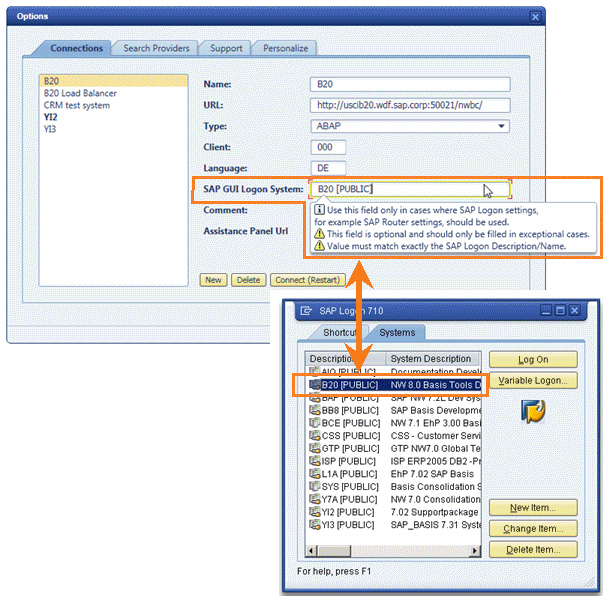 (SAP GUI Logon System and SAP Logon)
More Information
SAP Note 1040325: HTTP load balancing: Message Server or Web Dispatcher
URL Generation in an AS-ABAP - Web Dispatcher Configuration and Configuration Table HTTPURLLOC