3.4.1 Configuring Connections 
NWBC can have one or more connections defined to different servers. A connection contains all relevant data that is required to communicate to a server to retrieve all the relevant roles for a user. As NWBC, as shell, uses HTTP connections for its server communications, the connection data itself is also defined as an URL.
Although it is possible to define a number of connections, it is only possible to have one connection active at the same time. If a new connection is started to a different system, then NWBC will also be restarted to clear all cookies that are stored in process.
The connection data is usually provided by the system administrator and should just be configured.
You select the current system and configure systems in a configuration dialog box that you reach using the menu in the NWBC.
Choose  Personalize
  Options...
  . The configuration dialog box opens.
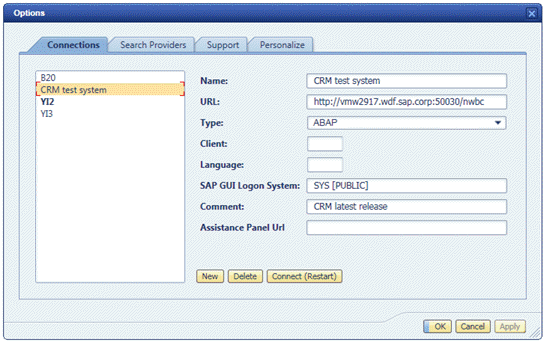 (Example of System Connection)
Setting |
Description |
|---|---|
Name |
A symbolic name for the connection. The name must be unique over all connections. |
URL |
This is the HTTP URL that is needed to connect to the server. The server name must include a fully qualified domain part as well. The complete syntax for the URL is: http(s)://<server>.<domain>.<ext>:<port>/<path> The protocol is either http:// or https://. For the server name, the complete domain and extension must be provided, for example, for a server at SAP, the complete string would be theServer.sap.com. Optionally a port can be defined if the default port of 80 for HTTP and 443 for HTTPS is not used. The path is usually either /sap/bc/nwbc for an ABAP-based connection, or /irj/portal for a portal-based connection. |
Type |
It is possible to connect with NWBC either directly to a single ABAP server (connection type ABAP) or to a portal server (connection type Portal). |
Client |
Only visible for a connection to an ABAP system. This is the 3–digit client to which should be connected, for example 000. |
Language |
Language of the UI of NWBC. |
SAP GUI Logon System |
Only visible for a connection to an ABAP system. This is the system description as defined in SAP Logon. Note that this must correspond exactly to what is specified in SAP Logon. The value of this entry must be 100% identical to the name used in SAP Logon, otherwise settings cannot be found and used by NWBC. Configure and test this system description via double click in SAP Logon. If it does not work in SAP Logon, it can never work in NWBC. For example, if you have an entry SYS [PUBLIC] in SAP Logon, and if you configure this entry just like this here, then the corresponding SAP Logon settings are used for NWBC connections. This setting causes all SAP GUI sessions to be processed with the configured SAP Logon settings, like SAProuter, group selection, etc. For information on SAP Logon configuration, press F1 on the SAP Logon window and the documentation will be displayed. Thus, features like group selection (load balancing) or SAProuter are also possible. For more information on load balancing, see 3.6 Using NWBC with a Load Balancer. All the SAP Logon settings will work for NWBC with the exception of Secure Network Settings. Another example would be if you have specified the NWBC connection via the SAP Logon entry XYZ [PUBLIC] and this entry XYZ [PUBLIC] is configured to work with SNC in SAP Logon, then this setting will force SNC Logon instead of SSO2 Logon.
|
Comment |
A user-defined comment that can contain any textual information. This is typically used to write a few descriptive words about the system. |
Assistance Panel Url |
for further enhancements |
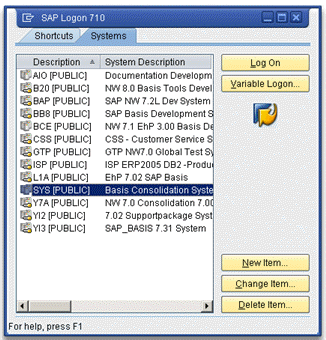 (Example of SAP Logon)