 Contract

Contract
Use
When creating and processing contracts, you can enter data in the AFS system at SKU level. The AFS system also allows you to create multi-level contracts, which you can use to optimize planning. The contract at the highest level of a multi-level contract is the one that determines the total quantity of various releasable materials of a material group. With reference to this AFS contract, you can create several quantity or value contracts that specify the value at material or SKU level more precisely.
Features
Simple Quantity and Value Contracts
To create a contract choose Logistics ® Materials management ® Purchasing ® Outline agreement ® Contract ® Create. The processing of data at SKU level in simple contracts essentially corresponds to the procedure in all
purchasing documents. SKU values can be copied from a reference object and from the purchasing info record and from grid control data (purchase grid). you come to the SKU Overview screen from the item overview. You can then enter SKU values and specify the quantity and stock category for each SKU. In addition, you can set the contract complete indicator for each SKU. The system also displays the schedule line number and the additional material number.
 Open target quantity. The system will display the still open quantities at SKU level. If one creates purchase orders with reference to this contract, the open quantities will decrease in the contract.
Multi-Level Contract
The AFS system allows you to build multi-level contracts and thus create contracts with various levels of detail in various planning periods. With this AFS function you can reserve capacities at your vendor already in an early planning phase by completing an AFS contract. This contract merely determines the total quantity, the material group, the selectable materials within the material group, and the validity period. You can create at a later time additional value or quantity contracts containing more detailed information at material or SKU level with reference to this contract. An AFS contract can only be called through another value or quantity contract, but not through a purchase order. The validity period of all value and quantity contracts that have been created with reference to another contract must be within the validity period of the superior contract.
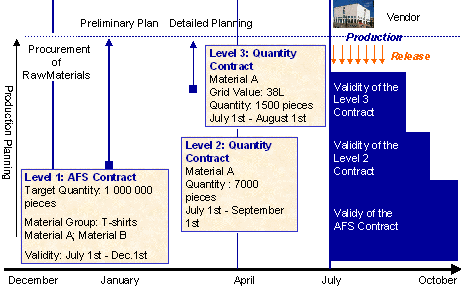
Example: You close an AFS contract with your vendor in January in which you agree to accept 1,000,000 pieces of materials A and B of the material group T-shirts in the time period between July 1st and December 1st. Based on this contract the vendor can at that time already count on the production of certain quantities and reserve capacities for you. At a later point in time you specify in detail which quantities of which materials / SKUs you need. In April you close a quantity contract with reference to the AFS contract, which specifies that you want to obtain 7000 pieces of material A during the time period of July 1st to September 1st. You specify any SKU values in a third contract, which is created with reference to the level 2 contract.
Activities
 to the view in which you can enter individual materials and prices.
 Released qty.
 in the standard toolbar to the right of the SKU table view. Then the input help (F4) will only offer you those grid values that are components of the superior contract. If you enter SKUs in the inferior contract that are not part of the superior contract or if the quantities of the inferior contract exceed those of the superior contract, the user sees either a warning or an error message, depending on the Customizing settings.