 Outlier Correction
Use
The system executes outlier correction to achieve stable forecast values. The system executes outlier correction for the demand forecast, order item forecast, and average demand size per order item (demand/item) forecast separately. The parameter for which the system performs outlier correction depends on the forecast strategy . The system performs outlier correction for each of the leading and constant parameters, but not for the dependent parameters. The outlier correction for the dependent parameters results from the outlier correction of the leading and constant parameters.
 Example
For the second-order exponential smoothing forecast strategy with item as the dependent parameter, the system only performs outlier correction for demand and the average demand size per order item.
 Note
Note
You can see which parameter is the dependent parameter for the individual forecast strategies on the SAP Easy Access
screen under 
Advanced Planning and Optimization

Service Parts Planning (SPP)
Planning
Forecasting
Interactive Forecasting
 in the input help of the
 Forecast Strategy
field.
Prerequisites
If you want the system to run outlier correction, then on the SAP Easy Access
screen under Advanced Planning and Optimization
Service Parts Planning (SPP)
Planning
Forecasting
Forecast Profile
on the tab page General,
you must have chosen Z for each location product in the Indicator: Automatic Outlier Correction
field.
Features
The following table shows an overview of the models for which the system executes outlier correction, and the formula it uses to calculate the standard deviation for the demand and for the average demand size per order item during outlier correction:
Forecast Model | System Performs Outlier Correction | Calculation of Std Dev. for Demand and Demand/Item for Outlier Correction |
|---|---|---|
First-order exponential smoothing | Dependent on the settings you made on the | Formula one for standard deviation (described below) |
Second-order exponential smoothing | Dependent on your settings in the | Formula one for standard deviation (described below) |
Moving average | Dependent on your settings in the | Formula one for standard deviation (described below) |
Linear regression model | Dependent on your settings in the | Formula two for standard deviation (described below) |
Seasonal trend model | Dependent on if your settings in the | Business Add-In (BAdI) |
Seasonal trend model with FPG | Dependent on your settings in the | Formula two for standard deviation (described below) |
Intermittent forecast model | Dependent on your settings in the | Outlier correction is part of the model. For more information, see Outlier Correction with the Intermittent Forecast Model . |
Dynamic moving average | Always | Outlier correction is part of the model. For more information, see Outlier Correction in the DMA Model . |
Declining demand forecast (DDF) | Always | Outlier correction is part of the model. For more information, see Forecast with Declining Demand Model . |
Outlier Correction for Demand Forecast
If the following condition is met, the system corrects the demand to the determined limit:

The demand forecast of which period the system uses depends on your entry in the forecast profile on the General
tab page in the Offset Forecast Creation
field.
Note
The system always uses the demand forecast of the period that is green on the Historical Forecasts
screen. You get to this screen on the SAP Easy Access
screen under Advanced Planning and Optimization
Service Parts Planning (SPP)
Planning
Forecasting
.
You can specify the parameter alpha in the forecast profile on the General
tab page in the Outlier Correction Parameter for Demand
field.
Outlier Correction for Demand Size per Order Item (Demand/Item)
If the following condition is met, the system corrects the demand size per order item:

You can specify the parameter beta in the forecast profile on the General
tab page in the Outlier Correction Parameter for Demand/Item
field.
Standard Deviation for Outlier Correction
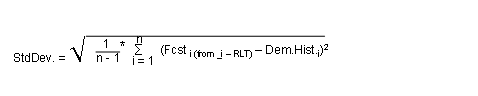
Depending on the forecast model, the system calculates the standard deviation according to one of the following formulas:
Formula One
Formula Two
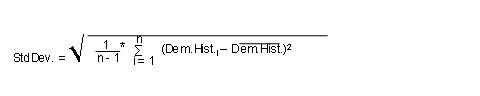
n specifies the number of periods over which the system calculates the standard deviation. You define this parameter dependent on model in the forecast profile on the
Model Parameter
tab page. For more information, see Calculation of Standard Deviation .RLT is the replenishment lead time.
Outlier Correction for Order Item Forecast
The system determines limits values for the outlier dependent on the forecasted lower limit for order items and the forecasted upper limit for order items according to the following table:
Forecasted Lower Limit for Order Items | Forecasted Upper Limit for Order Items | Limit Values for Outlier |
|---|---|---|
0 | 0,15 | 1 |
0,15 | 0,44 | 2 |
0,44 | 0,83 | 3 |
0,83 | 1,28 | 4 |
1,28 | 1,79 | 5 |
1,79 | 2,34 | 6 |
2,34 | 2,91 | 7 |
2,91 | 3,51 | 8 |
3,51 | 4,14 | 9 |
4,14 | 4,78 | 10 |
4,78 | 5,44 | 11 |
5,44 | 6,11 | 12 |
6,11 | 6,79 | 13 |
6,79 | 7,49 | 14 |
7,49 | 8,20 | 15 |
8,20 | 8,91 | 16 |
8,91 | 9,63 | 17 |
9,63 | 10,01 | 18 |
10,01 | infinite | Forecasted order items + 3 x square root of the forecasted order items |
Custom Outlier Correction
If you want to work with an outlier correction which you have defined, you can implement this in Business Add-In (BAdI) BAdI
: Define Custom Outlier Correction
(/SAPAPO/BADI_OUTLIER_CTRL).
Note
We supply this BAdI with an example implementation, which is based on medians and interquartile ranges and is particularly suited to slow-moving location products
For more information, see the Implementation Guide (IMG) for Advanced Planning and Optimization
under Supply Chain Planning
Service Parts Planning (SPP)
Business Add-Ins for Service Parts Planning (SPP)
BAdIs for Forecasting
.
In this case, in the forecast profile on the General
tab page select the value B
in the Indicator: Automatic Outlier Correction field for each of the location products.