 Forecast with Declining Demand Model
Purpose
In this process, the system executes a forecast using the declining demand model. This forecast model can be used for the discontinuation period of a product life cycle because it assumes there is declining demand for a product. The model avoids a trend that goes into a negative forecast. It creates an exponential curve of historical data and uses it to show future demand. The system calculates the exponential curve that has the smallest square error during the demand periods of the relevant historical data. The model is based on a quarterly aggregated demand history.
 Note
Note
You can only use this forecast model if you have chosen one of the following periodicities in Customizing:
Month
Posting period with exactly 12 posting periods per year
If you want to create the forecast for a location product with the forecast model "Declining Demand Forecast", the system first checks whether the location product fulfils the prerequisites for this model.If the location product does not fulfill the prerequisites the system creates an error message. If it does fulfill the prerequisites, the system carries out the forecast for the location product with this forecast model.
In addition, the system corrects the outlier before calculating the forecast. If the quarterly demand periods have zero demand, the system corrects this to one. After calculating the forecast, the system calculates the standard deviation and the MAD .
For more information about how the system chooses this model, see Automatic Model Selection .
Process
The system takes the demand from the first x periods of the historical analysis period and uses it to calculate the declining demand forecast.
You can define x on the
SAP Easy Access
screen under
Advanced Planning and Optimization

Service Parts Planning (SPP)
Planning
Forecasting
Forecast Profile
 on the
 Model Parameter
tab page in thePeriods in Declining Demand Forecast Model
parameter.You can define the historical analysis period in the forecast profile on the
General
tab page in theHistorical Periods
parameter.The system adds the demand for each three month period and aggregates the demand to quarterly periods.
The source values for calculating the forecast are the quarterly start points (QRT_st_pt) and the quarterly growth rate (DDF_QRT). The system calculates these source values as follows:
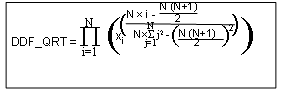

with
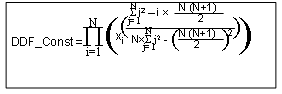
DDF is the declining demand forecast.
QRT means quarterly.
X i is the sum of the demand for each quarter.
N is the total quarterly period.
The system calculates the monthly declining growth rate as the cube root of the quarterly declining growth rate according to the following formula:
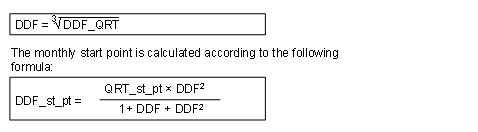
If the monthly growth rate is greater than one, the system rejects this forecast model as there is then no declining demand.
If the monthly growth rate is less than the
Lower Limit of Decline Factor
parameter on theModel Parameter
tab page of the forecast profile, the system increases the rate to this limit.The system performs validity tests to reset the start point in the following cases:
The upper limit of the start point forms the average monthly demand of the last year. This means that if the calculated start point is greater than or equal to the average demand, the system resets it to the average monthly demand of the current year.
The lower limit for products with low costs equals the monthly average of the previous year. This means that for these products the system resets the start point to the average monthly demand of the current year.
The lower limit for products with medium costs is 0.75 times the average monthly demand of the previous year.
The lower limit for products with high costs is 0.5 times the average monthly demand of the previous year.
You specify the threshold values for the costs of a product in the forecast profile on the
Model Parameter
tab page in theLow Cost Threshold in DDF Model
andHigh Cost Threshold in DDF Model
fields. If the price of a product is less than the low cost threshold, the product is a low-cost product. If the price of a product is between the low and the high cost threshold, the product is a medium-cost product. If the price of a product exceeds the high cost threshold, the product is a high-cost product.
The forecast is based on the calculated monthly start point and the monthly growth rate.
The system calculates the forecast for the forecast periods, which you can define in the forecast profile on the
General
tab page in theForecast Periods
parameter, according to the following formula: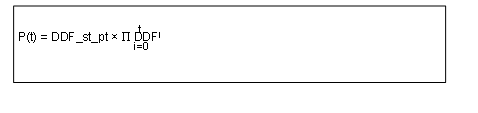
t = 0 to
Forecast Periods
parameter
After the forecast for the periods defined on the
General
tab page in the parameterForecast Periods
, the system pushes the time window one period forward and calculates the new declining demand forecast as described above.The system continues to push the time window forward by one period and calculate the declining demand forecast for each new time window until it arrives at the current period. At this point the ex-post forecast then goes over into the actual forecast.