 Calculation of the Standard Deviation and MAD
Use
The system calculates the standard deviation and the mean absolute deviation (MAD). This standard deviation is also used by other planning services in Service Parts Planning
, such as inventory planning.
Features
The calculation of the standard deviation and the MAD is part of the forecast model itself in the following forecast models:
For all other models the system uses the historical forecast to calculate the standard deviation and the MAD.
The system calculates the standard deviation as follows:
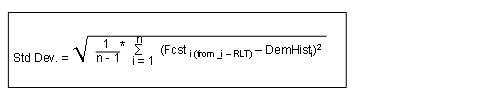
The system calculates the MAD as follows:
The system initializes the first three of the historical periods you defined for calculating the MAD
The system proceeds as follows:

You can enter weighting factors in Customizing under
Initialise Base Values.
For more information, see the Implementation Guide (IMG) forAdvanced Planning and Optimization
under
Supply Chain Planning

Service Parts Planning (SPP)
Forecasting
 .
.The system calculates the MAD according to the following formula:

i represents the current period.
You can specify alpha from the SAP Easy Access
menu under Advanced Planning and Optimization
Service Parts Planning (SPP)
Planning
Forecast
Forecast Profile
on the Model Parameter
tab page in the Alpha Factor
field. In the DMA model you specify alpha on the Model Parameter
tab page in the MAD Smoothing Factor for Demand in DMA Model
field.
i-RLT represents the period, in which the forecast for period i was created. You can specify this value in the forecast profile on the General
tab page in the Offset Forecast Creation
field.
n is the number of periods that you defined in the forecast profile on the Model Parameter
tab page.
The following table gives you an overview of which parameters you must define for which forecast model:
Forecast Model | Parameter |
|---|---|
First-order exponential smoothing |
|
Second-order exponential smoothing |
|
Moving average |
|
Linear regression model |
|
Seasonal trend model |
|
Seasonal trend model with fixed period groupings (FPG) |
|
Intermittent forecast model |
|
Dynamic moving average |
|
Declining demand forecast (DDF) |
|