 CTP Process When Creating the Sales Order
Purpose
This document describes the CTP process when creating and saving a sales order.
Prerequisites
You are using SAP APO along with an R/3 System and you have completed the settings for the APO Core Interface to enable the data transfer between the two systems.
You have made the settings required for the CTP process in both systems.
Process
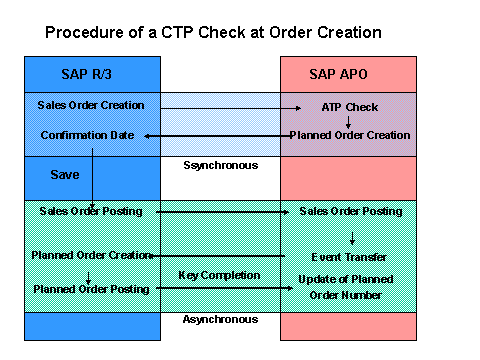
You create the sales order in the R/3 System entering the desired quantity and the desired date.
In SAP APO, an ATP check is carried out for the requirement online. Here, the system checks whether the quantity can be confirmed on the requirements date.
If the desired quantity cannot be confirmed or can only partially be confirmed, SAP APO accesses production planning and detailed scheduling (according to the Customizing settings in the check instructions ).
SAP APO creates a receipt element (planned order or stock transport requisition) for the missing quantity of the product in the sales order item. The system looks the up the available capacity and executes production planning, that is, the order is scheduled and the required components are calculated.
The order is planned using the bucket-oriented capacity check , taking into account the available capacity. Here, the system calculates the availability date of the product. You can also define that the system is to take the availability of important components into account. In this case, scheduling is executed at multi-levels. When calculating the availability date, the system takes account of component availability.
If you find out that the preceding CTP check has not created the desired planned orders, for example, only created planned orders in the past. Then you can execute the heuristic (SAP_CTP_DLG) from the product view. You can use this heuristic interactively to create receipts with better timing.
See also: Planning in the CTP Process with Planning Procedure 3
Capacity check using capacity reservation.
In addition to capacity check, the system also considers the reservations maintained on the resource while scheduling operations.
See also: Capacity Reservation and Maintaining Capacity Reservations .
At the same time, temporary requirements are created for the product to protect the planned order from competing sales orders. The function
of the temporary requirements corresponds to the external temporary quantity assignments of the ATP. See also: Reserving Temporary Planned Orders by Temporary Requirements
The result (confirmed quantity and date) is displayed in the delivery proposal screen. You accept the confirmation and return to the sales order entry in the R/3 System.
You save the sales order.
The sales order is posted in the R/3 System and then in SAP APO. In SAP APO, the temporary planned orders are converted into permanent planned orders. The temporary quantity assignments are deleted and the ATP time seriesare updated.
If, in Customizing for PP/DS, in the IMG activity
Maintain Global Parameters and Default Values,
you defined the settingAlways create transfer results
in the fieldsTransfer to R/3
andTransfer to R/3 External Procurement
, the system sends an event from SAP APO to the R/3 System when posting the sales order.After posting the planned order in the R/3 System, the planned order number is transferred to SAP APO and the planned order number in SAP APO is updated.
Results
You have created and saved the sales order. In planning, the system has created planned orders for the finished product and for the components, if necessary.
You can make changes to sales orders (increase/decrease the quantity, change date) but these changes trigger the execution of another CTP check.