
 Creating Language Resources Manually
Use
You use this procedure to create
language resources manually.
Prerequisites
There must be a user in the R/3 System which your service is using.
You must first create a
service file and at least one
HTML template (with or without a
flow file).
Procedure
Choose File
®
New and select the Files tab.
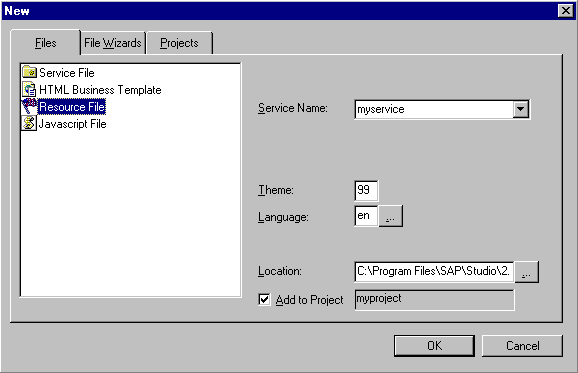
Select Resource File.
In the Service Name field, enter the service name or select one from the list box.
Enter theme and language information as required in the following fields:
- Theme
- If the service has more than one theme, enter the theme to which you want to assign the theme or accept the default value
- If the service does not have multiple themes, leave this field blank or accept the default value
- Language
- Enter a language or select a language from the list box.
If you enter a language explicitly, remember that the language key must be:
One character for R/3 releases prior to 4.0 (for example,
e
for English)Two characters for R/3 releases from 4.0 (for example,
en
for English)
If you select a language from the list box, you must also check R/3 4.0 System for Releases 4.0 or higher.
- Add the file to the current project or choose a different location:
- To add the file to the current project:
- Ensure that Add to Project is selected.
- To add the file to a non-project location:
- Deselect Add to Project.
- If you want to specify a project other than that displayed in the Location field, enter the desired project or browse to find a project.
- Choose OK.
Result
The SAP@Web Studio:
- Creates an empty language resource file called
<service>_<language>.htrc
and displays it in the
Workspace – Project View under the current service and theme (if applicable)
Opens the language resource file for editing in the
grid control editor